
.jpg)
.jpg
)
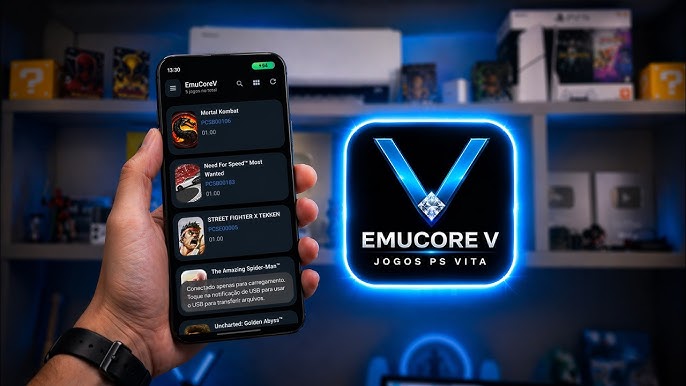
I almost gave up on PS Vita emulation completely. No joke. This was maybe six months ago. I grabbed the Vita3K Android port, watched a couple setup videos, downloaded firmware from 3 different sketchy sites, and spent an entire evening trying to get Persona 4 Golden to boot.
Every single time it crashed. The interface was a jumble of little bits of text and dropdowns obviously designed for a mouse pointer. My phone got hot enough to make me worry. I wound up just deleting the whole thing and going back to my PSP emulator which at least works without a fight.
So I didn’t jump on it right away when a guy on Reddit mentioned EmucoreV APK in a comment thread. "User-friendly Vita emulator" sounded like one of those claims people make about software that's still basically broken.
But then I kept seeing the name pop up. A Discord server here, a YouTube comment there. People saying the setup wizard actually worked. So one bored Saturday I caved and downloaded it.
Twenty minutes later I was playing Gravity Rush on my phone, no exaggeration. Didn't touch a file manager once. That was the moment I figured this thing deserved a proper look.
📌 What Is EmucoreV APK?
EmucoreV APK came from a developer named sashkinbro who apparently got tired of the same things that annoyed me. The core idea is straightforward. Vita3K exists and it's good at emulating the actual games.
It's been around for years, compatibility is solid, the developers know what they're doing. But the official Android port of Vita3K has a real problem. It feels like someone dragged a Linux application onto a phone screen and called it done.
Tiny icons, confusing menus, no guidance for new users. sashkinbro took that same Vita3K engine and built a wrapper around it specifically for Android. Built with Kotlin and Jetpack Compose, the latest in Android development — not some buggy cross-platform framework.
So, the result is an app that scrolls smooth, has buttons you can actually tap and doesn’t look like it escaped from 2007. The big selling point is that it automates all the setup crap.
Firmware installation is handled inside the app. Game installation figures out whatever format your backup uses. You don't need to decrypt things manually or hunt down license files. It just works.
🎮 How Does It Work?
How Vita emulation works on a phone isn't really that puzzling. The PS Vita had an ARM Cortex A9 CPU. Your new Android phone runs on an ARM chip, too. There's a fundamental architectural similarity there that makes the translation process easier than, say, emulating a Sega Saturn or something with a totally alien processor design.
EmucoreV APK uses something called a JNI bridge to link its nice Android interface to the Vita3K core underneath. It’s like two pieces talking to each other.
The front end is all the pretty stuff you interact with. The back end is raw C++ code doing the heavy computational work. When you tap a game in your library the app loads the Vita's operating system into your phone's RAM, mounts your game file like a virtual cartridge, and starts converting Vita processor instructions into commands your phone understands.
Graphics go through Vulkan, which is a modern rendering API that handles the Vita's graphical quirks far better than OpenGL ever did. I noticed something interesting while testing. The first time a new effect or area loads there's a tiny stutter.
That's the emulator compiling shaders on the fly. But those compiled shaders get saved. The next time you see that same effect it's perfectly smooth. So performance actually improves the longer you play, which is kind of backwards from how most phone games behave.
✨ Key Features Of EmucoreV APK - The Ones Worth Knowing About
🎨 An Interface That Doesn't Hurt Your Brain.
I've used emulators where I genuinely couldn't read the menu text without squinting. It's a common problem with ports of desktop software. Someone just shrinks the UI to fit a phone screen and calls it mobile-ready.
EmucoreV APK doesn't do that. Everything scrolls at 60 frames per second, the game library pulls cover art from online databases so it looks like a proper collection, and the dark theme doesn't torch your eyes at midnight.
The person who designed this clearly thought about how someone actually holds and uses a smartphone. Buttons are where your thumbs can reach them. Navigation makes sense without needing a tutorial video.
📥 Firmware Setup That Takes One Tap.
This feature alone saves more frustration than I can properly describe. The standard Vita3K build requires finding firmware files on your own. Then verifying they're not corrupted. Then placing them in some hidden folder that Android's file permissions system makes annoying to access.
It's a process that feels engineered to drive people away. EmucoreV APK launches a setup wizard the first time you open it. There's literally a button labeled download firmware. You press it. The app grabs the official system software automatically.
Maybe a minute of waiting and the whole thing is done. No external websites, no file managers, no watching setup guides at half speed. Just one button.
📦 File Format Handling That Actually Works.
The Vita homebrew community created a mess of formats over the years. VPK files, encrypted PKG installers, zRIF license strings, ZIP archives of raw dumps. Old emulators made you decrypt and convert everything using separate PC tools before you could even attempt to play.
It was tedious nonsense. EmucoreV APK takes whatever you throw at it. Point the file picker at your backup in any common format and the app figures out the rest automatically. Licenses get generated behind the scenes, archives extract themselves, games mount to your virtual home screen. You don't have to think about any of it.
⚙️ Per-Game Profiles That Remember Your Preferences.
Global settings are terrible for emulation. A 2D visual novel and a demanding 3D action game need completely different configurations. Crank resolution up across the board and you'll crash heavy titles.
Leave everything at minimum and you're wasting horsepower on simple games that could look better. EmucoreV APK lets you create custom settings for each individual game. Resolution scale, performance hacks, graphics filters, all saved per title.
My Uncharted Golden Abyss profile uses native resolution with aggressive tweaks. My Persona 4 Golden profile runs at 2x resolution since that game isn't nearly as demanding. Set things once and never touch them again.
🎮 Bluetooth Controller Support Without The Struggle.
Touchscreen controls work okay for turn-based stuff. Visual novels, RPGs, those are tolerable. Try playing an action game like Gravity Rush with virtual buttons and you'll want to frisbee your phone into a wall.
EmucoreV APK connects to Bluetooth controllers without any drama. I tested a DualSense, an Xbox controller, and a cheap telescopic gamepad I bought on Amazon. All three paired instantly with no lag I could perceive.
The remapping screen even handles the Vita's weird rear touchpad inputs. You can assign those to analog stick clicks or extra buttons. For games that used that gimmick it's honestly a better experience than original hardware.
💾 Save Management That Prevents Heartbreak.
I once lost 60 hours of Persona 4 Golden progress because an emulator update wiped my data folder. I'm still annoyed about it years later. EmucoreV APK has a save management tool that collects all your game saves in one place.
Couple taps backs everything up to a zip file. Upload that to Google Drive or whatever cloud storage you use. If something breaks you can restore individual saves or your whole library. It's the kind of quality-of-life feature the original Vita hardware never offered and I've already used it to recover my progress after a botched update.
💡 Benefits of Using EmucoreV APK
My launch Vita sits in a drawer now. The battery holds maybe forty minutes of charge on a good day. The proprietary charging cable is frayed and replacements cost more than they should. Those memory cards were a scam when the console launched and they're even worse on the used market now.
EmucoreV APK means my phone handles all of that. My phone is always in my pocket anyway so my entire Vita library comes with me automatically. I played through Tearaway on a cross-country flight last month and didn't stress once about my console dying mid-level.
The visual improvements are substantial too. Original vita games ran sub 720p on LCD screen since 2011. Running those same games on a modern OLED display at resolution scaling makes textures sharper, removes jagged edges and brings out colors that the old panel could never reproduce.
Games look like remasters, not decade-old handheld titles. You also get modern conveniences, like save states. Life doesn’t give a fuck about checkpoints. If my kid wakes me up crying in the morning, or I get an emergency call from work I save my state and close the app.
When I get back I am right back where I left off. That flexibility makes long RPGs actually possible to play for adults with responsibilities and little time to game.
🛠️ Tips to Get the Most Out of It
🏎️ Custom GPU Drivers Are Basically Required.
Snapdragon phone owners need to install custom Turnip drivers immediately. The default Qualcomm drivers that ship with phones are genuinely bad at emulation. Missing textures, weird artifacts, frame rate drops in games that should run fine.
EmucoreV APK supports loading Mesa Turnip drivers through settings. Grab the latest release from the GitHub repo, point the app at the zip, and watch your performance transform. Stuttery games lock to their target frame rate. This one tweak matters more than any other setting.
🔋 Keep Your Phone Cool Or Lose Performance.
Vita emulation pushes hardware harder than almost any native Android game. Twenty minutes of Uncharted turns my phone into something I don't want to hold. Performance drops because the processor throttles to prevent overheating damage.
Take your case off when emulating. Thick silicone cases are basically insulation blankets. Those clip-on phone coolers look ridiculous but they actually work. Steady frame rates for hours instead of minutes.
🎛️ Don't Go Crazy With Resolution.
I understand wanting to crank that slider to 3x or 4x. Sharp visuals are tempting. Rendering polygons at 4x internal resolution requires massive GPU power though. On demanding 3D games you'll tank frame rates or crash entirely.
Keep heavy titles at 1x or maybe 1.5x. Push 2D games and visual novels higher since they aren't doing complex rendering. The difference between 1.5x and 4x on a phone screen is barely noticeable anyway. Your eyes adjust in five minutes and you'll stop caring.
📂 Organize Your Files Or Suffer.
Android storage permissions are a maze designed by lawyers. Scatter game dumps across random folders and the emulator loses track of everything. You get failed installation errors and have no idea why.
Make one folder called "VitaGames" on your internal storage root. Put everything there. Avoid spaces and weird characters in names. Clean file organization eliminates most installation problems new users encounter.
🔊 Audio Crackling Has A Simple Fix.
Audio that sounds like a dying robot ruins immersion instantly. Most people assume their phone is too weak when this happens. Usually it's just a buffer setting. Go into audio configuration and increase the buffer size a notch or two. Introduces a tiny latency you won't notice but smooths out audio completely. Fixed this exact problem on three different phones with one adjustment.
📥 How to Download and Install EmucoreV APK Latest Version
The most reliable and safe place to download from I recommend APKview.com as your resource. Random download sites don’t have that security layer of checking APK signatures before publishing.
Step 1: Open the browser on your Android device and go to APKview.com.
Step 2: Type “EmucoreV APK” in the search box.
Step 3: Find the Latest Version of APK file Available Make sure it is from a trusted source on the site.
Step 4: Choose the download button. Your device might prompt you to confirm if you want to download the file – confirm if you want to download it.
Step 5: This is where most people get it wrong. You must allow installations from Unknown Sources. On most Android phones, go to Settings > Security > Unknown Sources and toggle it on. Some new phones may ask you to give permission for your browser only – just do what it tells you on your screen.
Step 6:Tap the downloaded APK file. It’s usually sitting in your Downloads folder.
Step 7: Click on Install and wait for few seconds. It's fairly fast.
Step 8: When done, open the app and sign up or login, if you have an existing account.
Just a note : If you get an error , then the file is probably corrupted or you downloaded the wrong version. Download it again or check your Android version to see if it is supported.
🔒 Is It Safe to Use? Here's the Honest Take
Safety conversations around emulators tend to get dramatic so let's keep things grounded. EmucoreV APK is open source under the GPL-2.0 license. That means the code is publicly viewable.
Anyone can read through it and check for malicious behavior. If something shady was hidden in there the community would find it fast and the project would be dead. That transparency protects you more than any antivirus app.
The application doesn't request weird permissions either. Storage access for reading game files is pretty much it. No contacts, no camera, no location data, no root access needed. Android's sandbox keeps everything contained.
The real dangers lurk in two places. First is where you download the APK. Random blogs with fifty popups often bundle tampered versions full of adware. Stick to APKview.com or official GitHub releases.
Second is where you source games. ROM sites are minefields of deceptive download buttons and bundled malware. Dumping your own cartridges is the safest approach legally and security-wise. The emulator itself is clean. Sketchy sources are what cause problems.
⚖️ Pros and Cons — The Unfiltered Take
✅ Pros:
- The firmware downloader automates the worst part of setup and saves hours of frustration hunting files online.
- Interface feels like a real Android app instead of desktop software that got lost and ended up on mobile.
- Solid game compatibility since it uses the mature Vita3K core that's been refined over years of development.
- Per-game settings let you optimize each title differently without constant menu diving.
- Custom GPU driver support on Snapdragon devices unlocks performance the official builds can't match.
- Bluetooth controller integration works immediately with no perceptible input lag across multiple brands.
❌ Cons:
- Still under active development so random crashes happen especially when adjusting settings mid-game.
- Requires a fairly recent flagship phone for smooth performance on demanding 3D titles.
- MediaTek and Exynos chips struggle badly due to poor GPU driver support compared to Snapdragon.
- On-screen controls get cramped and frustrating in action games making a physical controller nearly essential.
- Some Vita titles remain broken regardless of settings with specific games suffering major graphical problems.
🏁 Final Verdict — Is It Worth Downloading?
If you've got a decent Android phone and you miss the Vita's library of weird wonderful exclusives just download EmucoreV APK already. It's free, safe when grabbed from the right places, and actually delivers on making Vita emulation approachable.
I've been testing emulators since the early 2000s and this is one of the rare projects that made me genuinely excited instead of frustrated. Setup takes minutes instead of hours. The game library looks clean with cover art instead of boring file names.
Performance on good hardware is surprisingly solid. Playing Muramasa Rebirth on a modern OLED display at 2x resolution with a DualSense felt like discovering the game fresh. Keep expectations realistic though.
This isn't magic that makes every Vita game perfect on a budget phone from 2019. You need decent hardware, ideally Snapdragon. Bugs and crashes still happen occasionally. The compatibility list has gaps that probably won't close for a while.
But with the right device and legally backed up games EmucoreV APK turns your phone into the Vita successor Sony never built. It respects your time, looks good doing it, and improves with every update.
📱 EmucoreV APK vs Official Vita3K Build
People keep asking why not just download the official Vita3K Android port. It's a fair question since both use the same emulation core underneath. The difference comes down entirely to user experience philosophy.
Official Vita3K on Android is functional minimalism pushed hard. Interface copies the desktop version directly. Tiny icons hard to hit with thumbs. Menus requiring precision tapping. Zero guidance for newcomers.
Works fine for power users who enjoy reading logs and tweaking every parameter manually. EmucoreV APK is built for people who just want to play games without the headache. Same core engine wrapped in touch-friendly design with automated setup, cover art scraping, and sensible defaults.
The firmware downloader alone makes it the better pick for most people. Unless you genuinely enjoy the configuration process there's no reason to struggle with the barebones official version when this polished option exists free.
⚙️ What Hardware You Actually Need
Vita emulation demands serious hardware and don't believe anyone claiming otherwise. Minimum to boot most games is Android 9.0 with 6GB RAM but booting and playing comfortably are different things. Smooth 3D performance needs Snapdragon 8 Gen 1 or newer with 8GB RAM minimum.
The Snapdragon requirement comes down to GPU drivers. Adreno GPUs in Snapdragon chips allow sideloading custom Turnip drivers that fix bugs and boost performance dramatically.
MediaTek Dimensity and Samsung Exynos use Mali GPUs with terrible driver support for emulation. Projects like PanVK are slowly improving things but we're years from parity.
Shopping for a new phone with emulation in mind means ignoring camera specs and hunting for that Snapdragon branding. It makes that much difference.








