
Right so i've been messing with ps2 emulators on android since like 2016 maybe. and honestly most of them suck. like properly suck. you spend three hours watching youtube tutorials and reading some forum post from 2019 and the game still runs at 15 fps with audio that sounds like a broken microwave.
When emucorex started showing up in my feeds i ignored it for weeks. i was like yeah sure buddy another emulator that promises everything and delivers nothing. we've all been there. download something that looks legit, fire up need for speed, and it's a stuttery mess within thirty seconds.
But my brother kept bugging me about it. he's been using it on his pixel 8 and sent me a screen recording of shadow of the colossus running smooth. not perfect. but smooth enough that i actually wanted to try it. so i caved and installed it on my s24 ultra and also on an old oneplus 8t i had lying around just to see what happens.
Been testing it for maybe a month now. tried maybe twenty games across both phones. some ran beautifully. some struggled. couple had weird glitches. but overall? honestly way better than anything else i've used on android.
It's not perfect and i'm not gonna pretend it is. but it's the first time in years i've actually finished a ps2 game on my phone instead of quitting in frustration halfway through the setup.
📌 What Is EmuCoreX? The Engine Under the Hood
So emucorex is basically a ps2 emulator for android phones. that's the simple answer. the slightly more useful answer is that it's built on top of pcsx2 which if you know anything about emulation you already know is the best ps2 emulator on pc. it's been around since forever and it's open source which means a lot of smart people have spent a lot of time making it work properly.
What i actually like about emucorex though is that they didn't just copy the pc version and call it a day. they actually built a proper interface for phones. most mobile emulators look like someone designed them in 2007 and never updated anything. you open the app and it's just folders. boring gray folders with file names that mean nothing to normal humans.
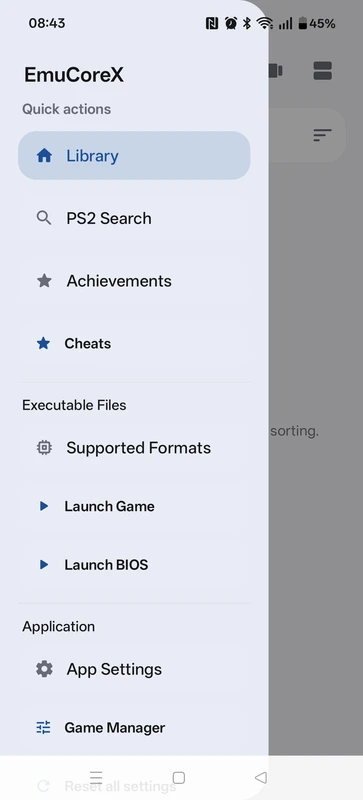
EmucoreX APK actually downloads cover art for your games. shows them in a grid with the box art. makes it feel like you're browsing your actual game shelf instead of digging through system files. it's such a small thing but it makes the whole experience way more enjoyable. i actually want to browse my library now instead of dreading it.
Also the code is on github which is a good sign. means the project is less likely to get abandoned randomly like what happened with aethersx2. still bitter about that one honestly.
🎮 How Does It Work? Translating Old Code for New Hardware
Ok so the technical side is actually kind of interesting. your phone doesn't natively understand ps2 games. the ps2 used this weird custom processor called the emotion engine and modern phones use arm chips. completely different architecture. the emulator has to translate everything on the fly, taking those old ps2 instructions and converting them into stuff your phone can process.
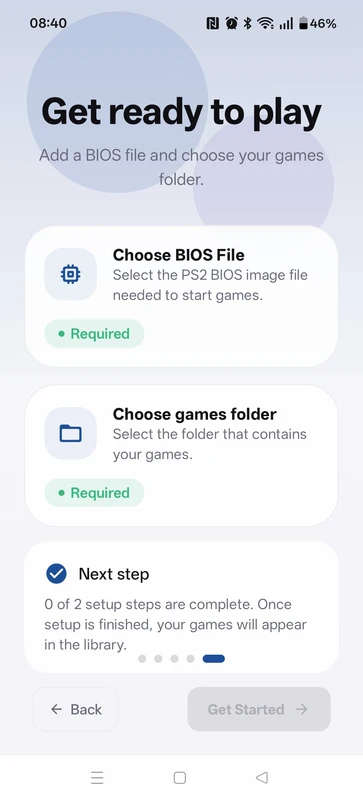
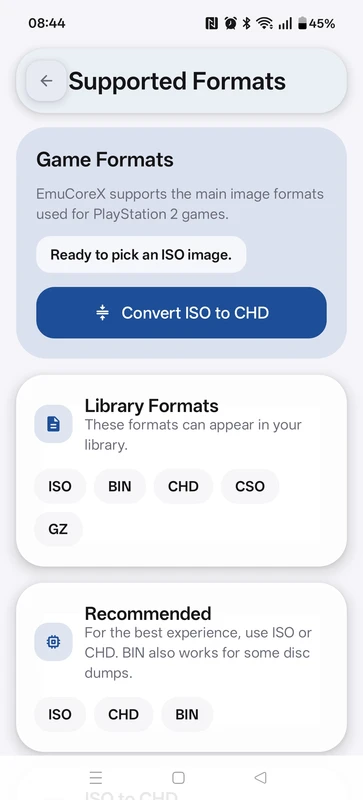
You need two things to make this work. a bios file which is basically the ps2's operating system. the app can't include this because sony owns it and that would be super illegal. you have to dump it from your own console which is a bit tedious but not the end of the world. there's guides online. second thing is game files. iso or chd format both work fine.
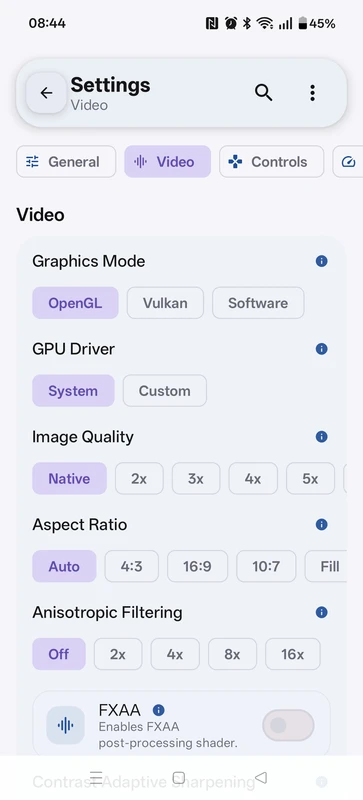
The graphics part is where it gets impressive. your phone's gpu can take those old low res textures and upscale them to look sharp on modern screens. games that looked fine on a blurry crt in 2002 suddenly look crisp and clean. it uses vulkan or opengl to handle the rendering and you can switch between them if one gives you better performance.
✨ Key Features Of EmuCoreX - Stuff That Actually Matters
📱 A Library That Looks Nice
Finally. finally someone made an emulator interface that doesn't look like a spreadsheet. it downloads cover art. organizes everything into a grid. actually pleasant to browse. took them long enough but here we are.
⚙️ Overlay Menu During Games
This is the killer feature honestly. you can open a transparent menu while the game is still running. change renderers. adjust resolution. toggle cheats. see the changes instantly without quitting back to the main menu and losing your progress. saves so much time when you're trying to get a stubborn game running right.
🎮 Controller Stuff That Works
Bluetooth controllers connect without hassle most of the time. xbox. playstation. generic ones. auto mapping usually works. touch controls are still touch controls, they're never gonna feel great for ps2 games, but the haptic feedback helps. your thumbs get a little buzz when you press something and it tricks your brain a bit.
🚀 Resolution Presets
Instead of confusing slider bars you get three options. quality. balanced. performance. pick one and move on with your life. the upscaling smooths out rough edges without murdering your frame rate. balanced usually hits the sweet spot on mid range phones.
💾 Save States and Cheats
Save anywhere you want. middle of a boss fight. during a cutscene. right before a stupid difficult jump. doesn't matter. also supports pnach cheat files for widescreen patches and 60 fps hacks which makes old games feel way better to play.
🔄 Gyro Mapping
You can bind the phone's motion stuff to analog sticks. tilt to steer in racing games. gyro aiming in shooters. sounds like a gimmick but actually try it with gran turismo or black. works surprisingly well. feels natural after a few minutes.
💡 Benefits of Using EmuCoreX - Why It's Worth Your Storage Space
Biggest benefit for me personally is i spend way less time tinkering and way more time actually playing games. i used to burn entire weekends just configuring emulators. different settings for every single game. digging through ancient forum threads looking for solutions to weird graphical bugs. it was exhausting and i barely got to enjoy the games i was trying to play.
This app has a setup wizard that gets you going in like five minutes. most games boot up without needing much adjustment. maybe you switch the renderer once and that's it. you're playing. it respects your time which is rare in the emulation world.
Also preservation matters to me. physical ps2 hardware is dying. disc drives fail. capacitors leak. hooking up an old console to a modern tv looks terrible without expensive scalers. having those games on my phone means they're not just rotting in a box somewhere. i can actually play them whenever i want.
And honestly the visual upgrade is real. native ps2 games on a big modern screen look rough. blurry. jagged edges everywhere. emucorex cleans everything up. widescreen patches make old games fill the screen properly. it's a legit better experience than original hardware in a lot of cases.
🛠️ Tips to Get the Most Out of It
⚡ Swap Renderers If Something Looks Off
If a game stutters or textures look weird just switch between vulkan and opengl. vulkan is faster on most newer phones. opengl fixes visual bugs in certain games. the overlay lets you switch instantly without quitting so just try both and see what works.
🔋 Take Your Phone Case Off
Ps2 emulation makes your phone hot. like actually hot. a thick case traps all that heat and eventually your phone throttles performance to cool down. suddenly your smooth gameplay gets choppy. just remove the case during long sessions. it helps more than you think.
🎮 Customize the Touch Layout
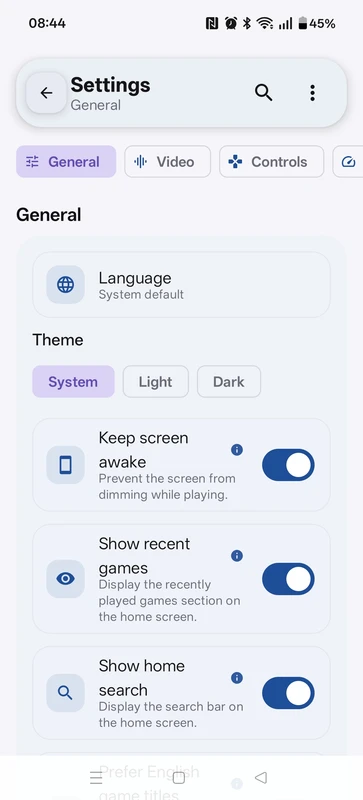
Default touch controls are just a starting point. go into settings and resize stuff. make analog sticks bigger. adjust opacity so they don't block the screen. shrink buttons you rarely use. spend five minutes tweaking and touchscreen gaming becomes way less frustrating.
📁 Keep Files Organized
Make a ps2 folder with subfolders for games and bios. don't scatter everything across your downloads folder like a chaos goblin. clean organization prevents permission issues and makes setup smoother when you point the emulator at your directories.
🚀 Start Conservative With Resolution
Don't immediately crank everything to maximum. 2x resolution already looks sharp on a phone screen. push higher only if performance stays solid. balanced preset in gsr is usually the right call for most mid range devices.
📥 How to Download and Install EmuCoreX APK Latest Version
The most reliable and safe place to download from I recommend APKview.com as your resource. Random download sites don’t have that security layer of checking APK signatures before publishing.
Step 1: Open the browser on your Android device and go to APKview.com.
Step 2: Type “EmuCoreX APK” in the search box.
Step 3: Find the Latest Version of APK file Available Make sure it is from a trusted source on the site.
Step 4: Choose the download button. Your device might prompt you to confirm if you want to download the file – confirm if you want to download it.
Step 5: This is where most people get it wrong. You must allow installations from Unknown Sources. On most Android phones, go to Settings > Security > Unknown Sources and toggle it on. Some new phones may ask you to give permission for your browser only – just do what it tells you on your screen.
Step 6:Tap the downloaded APK file. It’s usually sitting in your Downloads folder.
Step 7: Click on Install and wait for few seconds. It's fairly fast.
Step 8: When done, open the app and sign up or login, if you have an existing account.
Just A Quick Note – if you receive an error, the file might be corrupted or you might have downloaded the wrong version. Try downloading again, or check that your Android version is supported.
🔒 Is It Safe to Use? Here's the Honest Take
People worry about emulator apks and honestly they should. there's a lot of sketchy stuff out there. fake emulators packed with malware. apps that look legit but steal your data. it's a mess.
But emucorex itself is fine. it's based on pcsx2 which has been open source since forever and checked by tons of developers. nobody's found anything malicious. the app only asks for storage access which it needs to read your games and bios. it's not trying to access your contacts or camera or anything weird.
The actual risk is where you download it from. random websites with five fake download buttons and popups everywhere are how you end up with adware or worse on your phone. stick to places like apkview.com that actually verify their files and don't try to trick you.
Legal stuff is worth mentioning briefly. the emulator is legal. downloading bios files or roms for games you don't own is not legal. dump your own files from hardware you actually own and you're fine. what you do beyond that is your own business.
⚖️ Pros and Cons - The Unfiltered Take
✅ Pros:
- Clean interface with cover art that makes browsing your library actually enjoyable
- Pcsx2 core so game compatibility is really solid without endless tinkering
- Overlay menu lets you change settings mid game without quitting or losing progress
- Bluetooth controllers connect easily with auto mapping for most gamepads
- Upscaling and widescreen patches make old games look genuinely nice on modern screens
- Free. no ads. no paywalls. no subscription nonsense
❌ Cons:
- Older budget phones really struggle with demanding 3d games. you need decent specs
- Battery drains fast during play sessions. keep a charger handy
- Phone gets hot enough that it's uncomfortable without removing the case
- Bios setup adds an extra step that confuses people new to emulation
- Updates sometimes break things since development is active and ongoing
🏁 Final Verdict - Is It Worth Downloading?
Look i'm not gonna oversell this. it's not magic. if you have a potato phone from 2019 it's not gonna run god of war at 60fps. be realistic about your hardware.
But if your phone has decent specs? yeah absolutely download it. this is the best ps2 emulation experience i've had on android. it's not even close. i've actually been playing through games instead of spending hours in settings menus which is kind of the whole point.
It turns your phone into a portable ps2 that runs games better than original hardware in a lot of ways. cleaner visuals. faster loading times. save states everywhere so you're never stuck hunting for a checkpoint. widescreen support that actually works.
Grab it from apkview.com, set up your files properly, dump your own bios, and enjoy those classics you've been meaning to revisit for years. it's free and it actually delivers what it promises. can't really ask for more than that.








