
.webp
)
.webp
)
.webp
)
So you’ve heard whispers about Project Indigo. Maybe a photography-obsessed buddy won’t shut up about it. Or perhaps you saw an influencer post a shot that looked impossibly crisp for a phone pic.
I get the curiosity, and honestly, I get the skepticism too. When word got out that Adobe was dropping yet another camera app, I practically rolled my eyes into the back of my head. The App Store is a graveyard of camera apps promising the moon but delivering grainy, over-processed garbage.
So what could a "technology preview" from Adobe Labs possibly do that isn't already being done? As it turns out, quite a bit. But before I drag you down the rabbit hole of computational photography and zero shutter lag, I need to address the elephant in the room—specifically for my Android readers.
You’re likely here hunting for a Project Indigo APK because you feel left out. I’m going to rip the band-aid off right now: a legitimate Project Indigo APK does not exist. Not on some obscure forum, not on a third-party marketplace, and certainly not on some shady site promising "100% working mods." Those are scams, with malware or broken code designed to farm ad revenue.
I've watched too many people brick their devices falling for this. For now, this is an iOS exclusive playground. Adobe says an Android version is in the works, but we all know "eventually" can mean next month or next decade.
For the iPhone users still with me, stick around. This app is a genuine look at the future of mobile photography, crafted by the guy who essentially invented the Pixel’s camera magic.
I've been shooting with it for weeks now, and while it’s not a flawless fairytale, it’s the first app in years that’s made me leave my mirrorless camera at home.
📌 What Is Project Indigo Download APK?
Let’s cut the marketing speak and talk about what Project Indigo actually is. Not a social network. Not another filter factory like VSCO. Adobe Labs built Indigo as a living experiment to drag advanced DSLR logic into your pocket.
Consider it a sandbox where Adobe plays with bleeding-edge tech before adding it to its heavy hitters such as Lightroom and Photoshop. The key philosophy is simple: make a phone photo look like it came from a big, expensive sensor, without making it look artificially “HDR-bad.”
The secret sauce is computational photography. That’s just a nerdy way of saying the app fires off a rapid burst of up to 32 frames before and after you tap the shutter, then stitches the best bits into a single, super-clean DNG file. It’s fixing your highlights and shadows before you even realize there’s a problem.
The real headline here isn't just the tech; it's the talent. The project is spearheaded by Marc Levoy. If that name doesn't ring a bell, you've definitely seen his work—he was the brain behind Google’s HDR+ and Night Sight on the Pixel series.
Having him tinker under Adobe’s hood is a massive deal, and it shows in the final image quality. Right now, it's a free tech preview. No paywalls, no forced Creative Cloud login. Just raw, experimental power that you can grab from the App Store.
🎮 How Does It Work? The Shooting Experience
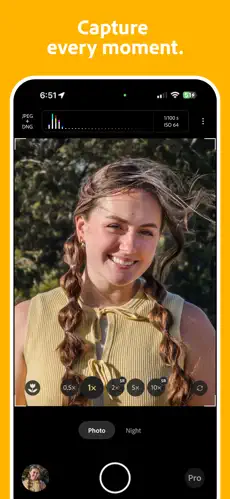
The flow of using Project Indigo feels distinct from your stock iOS camera. Once you fire up the camera you’re greeted with a minimalist viewfinder that gives you pro-level info – such as a live histogram and zebra striping – but doesn’t shove it in your face if you just want to point and shoot.
The real magic happens under the hood. In Photo Mode, the app achieves true zero shutter lag. The second your finger touches the button, the photo is locked in.
This was a lifesaver for catching my dog mid-sneeze or snapping candid street moments without that annoying half-second delay that makes you miss the shot. Then there’s Night Mode, which is where things get spooky good.
Instead of a single long blurry exposure, the app merges multiple shorter frames. If you can stabilize your phone—even just leaning it against a glass—it does this "synthetic long exposure" thing that turns city lights into creamy trails without needing a tripod.
The interface is a sweet spot between Apple’s simplicity and the intimidating dials of a Sony Alpha. You don't have to touch a slider if you don't want to, but the tools are there, staring at you, daring you to take control of the exposure triangle.
✨ Key Features Of Project Indigo – The Ones Actually Worth Your Time
🧠 The Computational Photography Pipeline
This isn't just a filter; it's the engine. By merging up to 32 frames, Indigo builds a noise-free, high-dynamic-range image from scratch. The difference is noticeable in the shadows. You can lift a dark area in Lightroom and find actual texture instead of the usual colorful static and noise. It’s like the phone is capturing security footage and art at the same time.
🎨 A Refreshingly Natural Aesthetic
If you're sick of phones turning grass into radioactive green slime or skies into electric blue candy, you'll love this. Indigo is meant to be realistic like a DSLR. Skin tones are accurate, and the micro-contrast enhances textures without obvious sharpening halos. It’s subtle, but once you’ve seen the organic look, the over-processed iPhone JPEGs start to look a little tacky in comparison.
⚙️ Genuine Professional Controls
You get full manual control over focus, shutter speed, ISO, and white balance. There’s even a focus loupe that digitally zooms into the frame to confirm you’re tack-sharp. It’s not just sliders for the sake of it; it’s a thoughtful toolkit for photographers who know their way around the exposure triangle.
🔭 Super-Resolution Zoom
Since we don’t have a 10x optical periscope on every phone, Indigo uses frame alignment to fill in the gaps. Is it magic? No, optical physics still wins. But it's leagues ahead of the standard pinch-to-zoom mush you usually get. Crops look like they were captured with more sensor resolution than you actually have.
🌿 Surprisingly Usable Macro Mode
I’m usually a macro snob, but the multi-frame processing makes close-up textures look sharp without the heavy crop factor destroying the detail. I snapped a dewdrop on a leaf, and the refraction was actually crisp—not a blurry mess of algorithmic guesswork.
🔄 Seamless Lightroom Handoff
This is the ecosystem play. You shoot in RAW DNG, and with a tap, the file moves directly into Lightroom Mobile. It’s a closed-loop workflow that feels professional. No exporting to camera roll and then re-importing. It just flows.
💡 Real Benefits of Running Project Indigo
So why ditch the default app? For me, the benefit is closing the "good enough" gap. I used to lug a heavy camera strap everywhere because my iPhone photos fell apart under scrutiny. With Indigo, I’m getting geometrically corrected, noise-reduced RAWs that can actually handle a heavy edit in post.
The dynamic range is the standout hero here. One click and you’re holding on to the color of a bright window, not letting the room inside go to black. This is a game changer for content creators because you are no longer fighting the aggressive texture smoothing and over sharpening that Apple forces on you.
You get the raw ingredients to bake your own look. There's a massive psychological benefit too: it’s free and login-less.
In an era where everything requires a monthly blood sacrifice, opening an app and just having it work without a pop-up asking for your email feels revolutionary. You can just shoot. If Adobe eventually decides to paywall this, I'll probably cry, but for this fleeting moment in history, it’s a steal.
🛠️ Tips to Get the Most Out of It
📱 Check Your Hardware Before You Invest Time
Don't bother if you're on an older device. This thing thrives on the Neural Engine of recent chips. You want an iPhone 12 Pro or newer, but honestly, the 15 Pro and 16 series make the processing almost instantaneous. On older phones, it’s a heating, stuttering mess.
🌈 Toggle Off "Just Auto" and Touch the Dial
Even if you’re a beginner, try the Exposure Compensation (EV) slider. The auto-metering is good, but often it protects highlights too aggressively. Dialing in +0.3 or +0.7 stops can turn a gloomy snap into an airy, editorial-looking frame instantly.
🦓 Use the Zebra Stripes Religiously
Those red zebra patterns aren't just flashy gimmicks; they're your safety net. When stripes appear on a white shirt or a sky, you're losing data that you can never recover in the raw file. Tap to adjust exposure until the stripes vanish, and your images will instantly feel more professional.
🌙 Night Mode Needs an Anchor Point
The long exposure simulation is peak computational magic, but it’s unforgiving. Even your steady hand creates micro-shifts. Prop your phone against a solid object—a wall, a curb, a coffee mug. You’ll get the milky water or light trails without the ghosting that ruins the sharpness of static objects.
🔍 Don't Ignore the Focus Loupe
If you're shooting a portrait or a product shot, pinch to enter the loupe mode. Autofocus on phones sometimes grabs an eyelash instead of an iris. This manual confirmation is the difference between a keeper and a "sharp-enough-for-Instagram" softie.
📥 How to Download and Install Project Indigo APK Latest Version
The most reliable and safe place to download from I recommend APKview.com as your resource. Random download sites don’t have that security layer of checking APK signatures before publishing.
Step 1: Open the browser on your Android device and go to APKview.com.
Step 2: Type “Project Indigo APK” in the search box.
Step 3: Find the Latest Version of APK file Available Make sure it is from a trusted source on the site.
Step 4: Choose the download button. Your device might prompt you to confirm if you want to download the file – confirm if you want to download it.
Step 5: This is where most people get it wrong. You must allow installations from Unknown Sources. On most Android phones, go to Settings > Security > Unknown Sources and toggle it on. Some new phones may ask you to give permission for your browser only – just do what it tells you on your screen.
Step 6:Tap the downloaded APK file. It’s usually sitting in your Downloads folder.
Step 7: Click on Install and wait for few seconds. It's fairly fast.
Step 8: When done, open the app and sign up or login, if you have an existing account.
Just a note : If you get an error , then the file is probably corrupted or you downloaded the wrong version. Download it again or check your Android version to see if it is supported.
🔒 Is It Safe to Use? The Privacy Reality Check
Let’s talk safety and privacy, because putting Adobe's lab software on your phone requires a bit of trust. If you grabbed it from the official App Store, you are completely safe from a security standpoint.
This isn't a sideloaded enterprise certificate waiting to expire; it’s sandboxed by Apple’s strict rules, and Adobe isn’t in the business of bricking iPhones. However, the "safe to use" conversation shifts when we talk about APK culture.
The predatory nature of "free APK" sites is the real danger here. These sites clone the tech preview screenshots but inject the file with adware. If you’re on Android and tempted to click a download link promising an Indigo port, you are not getting the computational engine built by Marc Levoy.
You’re getting a fake skin that likely harvests your contacts or displays phishing pop-ups. On iOS, the app does collect usage data—things like which features you tap—and it asks for location to tag the photo metadata.
Adobe states this data is not linked to your identity, which is standard boilerplate for a beta research project. Just be aware you’re using a lab experiment, not a finalized, locked-down product.
⚖️ Pros and Cons — The Unfiltered Take
👍 Pros:
- The zero shutter lag makes capturing fleeting moments almost too easy; it removes the "camera curse" where the moment ends before the shutter fires.
- The multi-frame noise reduction produces shockingly clean images in twilight settings where the stock app produces watercolor-like mush.
- The deep Lightroom Mobile integration with RAW DNG support allows for granular shadow recovery that doesn't break down.
- The user interface strikes a rare balance, giving you a live histogram and focus peaking without hiding the basic viewfinder behind endless menus.
- There is no price tag. You aren't charged a subscription and you don't have to sign in, making it a guilt-free way to experiment with Adobe's highest-end tech.
👎 Cons:
- The iOS exclusivity is maddening for the Android crowd, and Adobe's vague roadmap offers little comfort.
- It's a beta in its soul. I've experienced the occasional crash when switching lenses too fast or rapid-firing in high-stress lighting scenarios.
- Hardware limitations are real; if you are on an iPhone 13 or a non-Pro model, the processing lag can increase, and your phone might get worryingly warm.
- There’s a looming fear that this "free" tech preview is merely a trial balloon, and the best features will eventually be locked behind a $20/month Creative Cloud plan.
🏁 Final Verdict — Should You Download Project Indigo?
If you have a compatible iPhone, you’d be genuinely foolish not to download it. It’s the most significant leap in mobile image processing I’ve seen since the Pixel 4's astrophotography mode, and it doesn't cost a dime.
It’s not a gimmick app that just slaps a teal-and-orange filter on your cat photos. It fundamentally rethinks how your sensor and chip talk to each other, capturing data you didn’t know your phone could see.
I’ve left my bulky camera at home for casual dinners and walks because the RAW files coming out of Indigo actually hold up on a monitor. The natural color science and the robust highlight recovery make editing a joy rather than a salvage operation.
The only real downside is the "wait and see" factor regarding its future price and the absolute silence on the Android release. But for right now, the risk-reward ratio is infinitely skewed in your favor.
Don't waste your time hunting for an Android APK—you'll just hand your data to a phishing site. But for Apple users, open the App Store, delete those ten other camera apps you never use, and give this a shot. Project Indigo makes the camera bump on your phone feel like it’s finally living up to its hardware potential.








