
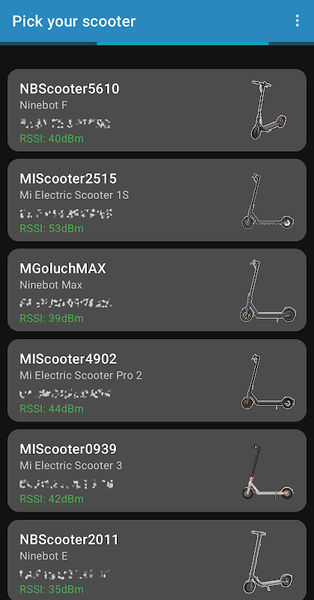
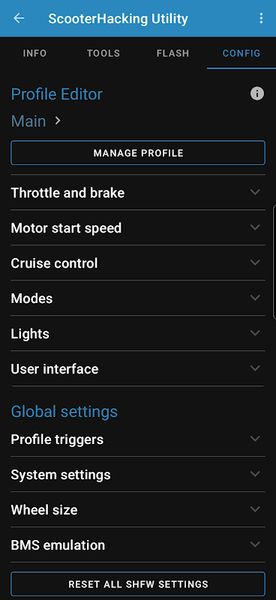
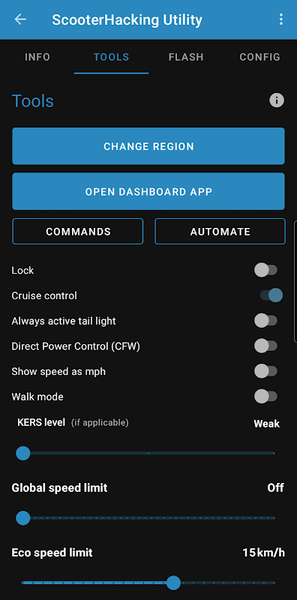
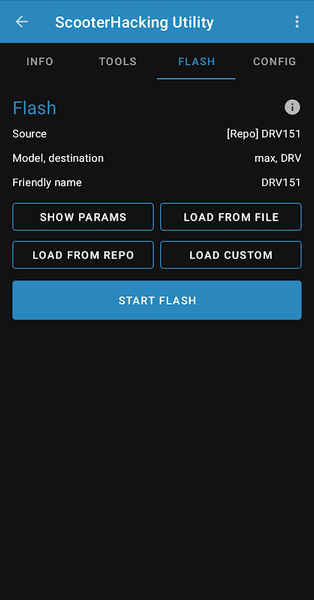
Honestly, I got fed up. My Xiaomi scooter was physically fine, but the official app felt like it was designed to tell me as little as possible. Battery percentage, a speed number, a lock button. That is it. I am riding something with a real motor, a proper battery management system, Bluetooth connectivity - and I am getting four data points like its 2012.
I started searching around and kept seeing ScooterHacking Utility come up. On Reddit, in forums, in YouTube comments under scooter mod videos. So I actually looked into it.
This article is not a padded list of "top scooter apps." I want to walk through what ScooterHacking Utility APK really does, how the firmware stuff works under the hood, what can realistically go wrong, and how to install it without causing problems.
If you own a Xiaomi or Ninebot scooter and the official app has been driving you crazy with how little it shows - this is the read you have been looking for.
📌 What Is ScooterHacking Utility? — More Than Just a Tuning App
Scooterhacking Utility V3 Beta APK (most people call it SHU) is a free Android app made by the team at ScooterHacking.org. They are not a company in any traditional sense - more like a community of people who spent years reverse-engineering these scooters and eventually built proper tools around everything they found.
What the app does, put simply, is give you Bluetooth access to parts of your scooter that Xiaomi and Ninebot deliberately keep hidden in their own apps. Real battery data. Motor temperature. Actual firmware versions running on your hardware. And yes - the ability to change things. Speed limits, region settings, power delivery curves, all of it.
Compatible models as of 2025:
- Xiaomi M365, Pro, Pro 2, 1S, Lite, and 3
- Ninebot ESx, E2x, E4x, Max, T15, F-series
- Ninebot P100
If yours is on that list, the app can do a lot for you. If not, it might still detect the scooter, but functionality gets inconsistent quickly outside the supported lineup.
Over a million installs on Google Play. 4.4 stars from 552+ ratings. Version 3.0 is the current build. No ads. No account needed. No payment anywhere. The developers are upfront that they have no connection to Xiaomi or Ninebot - and equally upfront that whatever you do with the app is on you. That transparency is actually a good sign.
🔧 How Does It Actually Work? - The Part Most Articles Skip Over
Your scooter is not one electronic system - it is three separate ones talking to each other. The BLE module handles Bluetooth. The ESC (Electronic Speed Controller) runs the motor - acceleration, braking, speed limits. The BMS (Battery Management System) manages everything battery-related - cell charging, discharging, balancing.
The official Xiaomi app taps into the BLE module and pulls a small, curated set of data. Enough to look functional. SHU connects to all three systems and reads what they actually expose. You can see individual cell voltages in your battery pack rather than just a total percentage. You can see the specific firmware version on each controller separately.
Now the part people are usually most curious about - flashing.
Flashing means replacing the firmware running on one of those controllers. SHU can push original (vanilla) firmware from Xiaomi - essentially a factory reset to whatever they shipped. Or it can push custom firmware (CFW), which is where things get interesting.
The ScooterHacking community has built CFW that removes manufacturer speed limiters, changes how torque is delivered by the motor, adjusts regenerative braking strength, and more.
SHU has a CFW builder built directly into the app. You pick your model, choose your parameters, it generates the firmware file, you flash it. All from your phone. No PC, no browser tools, no piecing together files from forums. That convenience alone puts it ahead of what people were doing before this app existed.
One thing worth knowing upfront - flashing takes a few minutes over Bluetooth and the connection needs to stay stable throughout. If it drops mid-write, things can go sideways. There is a whole tips section below for how to handle this properly.
✨ Key Features of ScooterHacking Utility APK - What It Actually Gives You
🔋 Real Battery Data, Not Just a Percentage
The feature I find most useful day-to-day. SHU shows individual cell voltages across your battery pack. When cells start aging unevenly - which they all eventually do - you see it here before the scooter starts acting strange on the road. The official app shows a percentage. SHU shows you what is actually happening inside the pack.
⚡ Speed Limit Adjustment
Factory cap on most Xiaomi models is 25 km/h. SHU lets you raise that. A lot of riders do this for private property, tracks, or places where local law does not restrict e-scooters to 25. You can also bring it down - handy for letting a new rider use your scooter without handing them full throttle by default.
🛠 Built-In CFW Builder
Old workflow for custom firmware involved a browser tool, downloading a ZIP, moving it to your phone, then flashing. SHU collapses all of that into one place. Pick model, choose settings, build, flash. Done.
🔄 Flash BLE, ESC, and BMS Separately
You do not have to flash everything at once. If you only want to update the ESC firmware, you do that without touching the BLE module. Useful when you are trying to fix something specific and do not want to change more than you need to.
🔁 Region Unlock
Xiaomi ships different regional firmware with different built-in speed caps. European firmware has stricter limits than some other regions. SHU lets you switch the region setting, which changes which regulatory cap applies. You are not doing anything exotic - just selecting a different configuration the manufacturer already built.
🌍 Roll Back Firmware
This one gets underrated. Xiaomi has pushed updates that changed scooter behavior in ways many riders did not like - different braking feel, changed power delivery. SHU lets you go back to the previous version. The official app will never give you that option.
📥 Auto-Actions on Connect
You can set SHU to automatically pull stats the moment it detects your scooter. Small thing, but if you check your scooter before every single ride, it cuts out a few taps every day.
🏗 SHFW Support
SHFW is the community's main custom firmware project - more advanced than basic CFW with deeper customization options. SHU supports installing it directly on compatible models.
💡 Why People Actually Keep Coming Back to This App
The honest answer is it is about knowing what is actually happening with your hardware.
I caught a cell in my battery pack reading noticeably lower than the others - caught it early because SHU was showing me individual voltages. The official app had a perfectly normal-looking 71% at the time. Nothing to suggest anything was off. That kind of gap has real consequences for how long your battery lasts and how safe your scooter is to ride.
The firmware rollback is more practically useful than it sounds too. When Xiaomi pushed a BMS update that changed braking behavior on certain M365 units, people were annoyed and stuck with it - unless they had SHU. Rolling back took a few minutes. Without it, there was no recourse.
There is also just the matter of cost. Paid scooter utility tools exist. Some charge for features that SHU gives away for free. The app has been free since it launched and continues to be. That is not something you can take for granted in this space.
🛠️ Tips to Get the Most Out of ScooterHacking Utility — Stuff That Actually Matters
💾 Back Up Before You Flash Anything — Seriously
SHU can read and save whatever firmware is currently running on your scooter. Do this before any changes. If a flash goes wrong, that backup is what gets you back to where you started. People who end up with unresponsive scooters after flashing almost always skipped this step.
📖 Spend Time on the Wiki Before Your First Flash
wiki.scooterhacking.org has individual pages by model. The same parameter does not always mean the same thing across different scooters. What adjusts the speed limit on a Pro 2 is not necessarily the same setting on a Ninebot Max G30. Spend time on the right page before touching anything.
🔌 Keep Both Devices Charged During Flashing
Scooter should be 80% or above. Your phone should not be below 50%. A Bluetooth disconnect mid-flash because your phone dropped into battery saver mode is one of the most common causes of a botched flash. It is a fully preventable problem.
📶 Flash Somewhere With Clean Bluetooth Signal
Do not do your first flash in a busy apartment building with dozens of Bluetooth devices competing for signal. Somewhere with less interference, phone close to the scooter, and do not let your screen lock in the middle of it.
🧪 Change One Thing at a Time
The temptation when you first get access to the CFW builder is to change everything at once. Resist it. Change one setting, ride the scooter, see how it feels, then move to the next. If something behaves unexpectedly, you will know exactly what caused it.
🗣️ Use the Community When You're Stuck
The ScooterHacking Discord and forum are genuinely active. If you hit something unexpected, post your model, firmware version, what you changed, and what happened. Most failure modes have been seen before and people there can usually help you through it.
📥 How to Download and Install ScooterHacking Utility APK — Step by Step
The safest place to grab it is APKview.com - they host the verified, unmodified APK file. Here is the full process:
Step 1 - Go to APKview.com on your Android device
Use the search bar to find "ScooterHacking Utility." Check that the developer listed is ScooterHacking.org before downloading anything.
Step 2 - Download the APK file
Tap download. The file is around 9-10MB so it will land in your Downloads folder fast.
Step 3 - Enable installs from unknown sources
Android blocks APKs from outside the Play Store by default. Go to Settings, then Security, then Install Unknown Apps, and toggle it on for your browser or file manager. You can turn it back off after you have installed SHU.
Step 4 - Open the file and install
Navigate to Downloads, tap the SHU APK, confirm the install prompt. Takes about 20 seconds.
Step 5 - Let the app update itself
SHU has a built-in updater. First time you open it, let it check for and apply any update. You want to be on the latest build before connecting to your scooter.
Step 6 - Connect to your scooter
Power the scooter on. Enable Bluetooth on your phone. Hit the scan button in SHU. Your scooter should appear in a few seconds. Tap it. The app connects and starts reading firmware versions and live data almost immediately.
That is the whole install process. The complexity only comes in if you decide to flash firmware - and that is when the earlier tips matter.
🔒 Is ScooterHacking Utility APK Safe? — Honest Take, Not a Sales Pitch
The app itself - yes, clean. It is on Google Play, the source is a well-known community, there are no strange permissions, no hidden data collection, nothing running in the background that should not be. The APK from APKview.com is the same file as the one on utility.cfw.sh, the official download page. No reason to distrust it.
That said - what you do with it is a different question.
Flashing firmware is not risk-free. People do end up with scooters that will not respond after a failed flash - usually because of a Bluetooth drop mid-write, wrong firmware version for their exact hardware revision, or battery dying at the wrong moment. In most cases it is recoverable. The wiki documents recovery steps for supported models. But most is not all, and the edge cases exist.
The warranty point is simple: flashing custom firmware voids it. Whatever warranty coverage Xiaomi or Ninebot offered goes away the moment you do this. If your scooter is still within warranty and that matters to you, factor it in. Some people wait until it expires. Some decide the trade-off is worth it right now. That is a personal call.
And on the road - raising your speed above the legal limit in your area is on you, not the app. SHU does not know where you are riding.
The bottom line: the app is trustworthy. What you do inside it requires a bit of judgment.
🌐 The Community Behind the App — Why This Thing Actually Gets Better
Most hobby tools die when the person who built them loses interest. SHU has not, because it is backed by a genuine community rather than a single developer.
ScooterHacking.org runs a wiki, a Discord, a Telegram group, and a forum. People there have been tracking Xiaomi and Ninebot firmware releases for years. When a manufacturer pushes an update, someone in that community is pulling it apart within days, figuring out what changed, and updating the tools if needed.
Version 3.0 arrived with a redesigned scan screen, updated SHFW metadata, labelling fixes, and bug squashes - changes that came directly from user feedback and real-world testing.
If something breaks after an update, there is a real place to go ask. That is rarer than it should be in the world of scooter modification tools.
️⚖️ Pros and Cons — The Honest List
✅ Pros:
- Completely free, no ads, no subscription, nothing hidden.
- 1M+ installs, 4.4-star rating on Google Play - proven track record.
- Wireless via Bluetooth, no cables or special hardware needed.
- CFW builder inside the app - no external tools required.
- Diagnostic depth the official apps simply do not offer.
- Self-updating APK keeps itself current between Play Store releases.
- Active community for real troubleshooting support.
- Works across the most popular Xiaomi and Ninebot models.
- Can roll back firmware if official updates change things you liked.
❌ Cons:
- Firmware flashing carries bricking risk without proper preparation.
- Voids manufacturer warranty once you flash.
- Bluetooth reliability during flashing varies across Android devices.
- Not every feature works on every model or firmware version.
- Some scooters get no support at all.
- Enabling unknown sources is an extra step that some people find confusing.
- Real learning curve - needs wiki time before first flash, not a pick-up-and-go tool.
🏁 Final Verdict — Worth It or Not?
If you have a supported Xiaomi or Ninebot scooter and the stock experience has been frustrating - either the data it hides, the limits it imposes, or both - SHU is the best free option available on Android for actually doing something about it.
If you plan to flash anything: read the wiki for your specific model, back up what is already on your scooter, charge both devices properly. Those three steps prevent the majority of what goes wrong.
If stock settings are genuinely fine with you, you probably do not need it. But if you have wondered what your battery cells are actually doing, or why a speed limit exists on your own private property, or why Xiaomi got to decide what firmware you run on hardware you bought - SHU answers all of that.
Download it from APKview.com, spend some time on the wiki before your first session, and you will be in a much better position than going in blind.








