
Timeline Visualizer APK saved my sanity a few weeks ago. Not exaggerating either. I woke up, made coffee, checked email like always, and there it was. That vague notice from Google. You know the one. They're gutting Location History, moving timeline off the web, locking it to your phone's storage.
Years of my life live in that data. Road trips across the country. Late night taco runs from junior year. Hiking trails I'd never find again without a map. Full vacations mapped day by day. I freaked out and did the Takeout download thing immediately.
Three days later Google finally emails me my link. What do I get? A JSON file so huge and messy it looked like my screen was broken. You can't open that on a phone and get a pretty map. It's just lines of code and timestamps and coordinates. Endless.
Spent hours on forums and Reddit threads trying to find some way to see my own travel history without learning how to code. Just wanted my routes back.
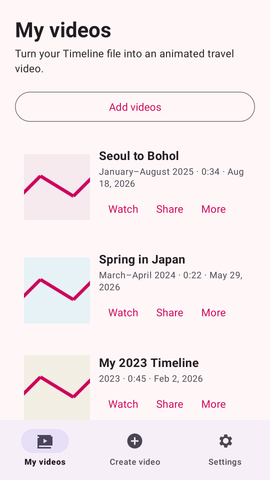
That's when I found this open-source thing. It's basically a translator for your data. Takes all that raw junk and spits out a high quality animated travel video. Something you can actually watch.
So yeah, that's what I want to talk about today. Timeline Visualizer APK, how it works, why it doesn't give me privacy nightmares, what settings keep your phone from cooking itself, and the easiest way to get it running on Android right now.
🌍 Why Google Broke Location History in the First Place
Before we get into fixing the problem, I think it helps to understand why we are even in this mess. For over a decade, Google Maps users had this beautiful luxury. You could log into Google on your desktop browser, click on your Timeline, and see a massive, interactive map of your entire life. It was awesome.
Then privacy concerns started taking over the tech world. Google realized that holding onto the highly specific location data of billions of people on a centralized cloud server was basically a massive liability. Law enforcement agencies were increasingly using geofence warrants to demand Google hand over data on anyone who happened to be near a crime scene.
To avoid dealing with that, Google pulled the plug. They shifted Location History to be stored entirely locally on your specific physical phone. It is a massive win for actual privacy, but a total nightmare for user experience.
The web version of the timeline was completely shut down. If you lose your phone now and you haven't set up encrypted cloud backups properly, your travel history is gone forever. This massive shift is exactly why everyone is suddenly holding onto exported JSON files and desperately looking for ways to visualize them offline.
📌 What Is Timeline Visualizer APK?
Timeline Visualizer APK is essentially a highly specialized bridge for your raw Google data. It takes that gigantic, messy JSON file that Google Takeout spits out and mathematically converts it into an MP4 video of your route.
Instead of staring at endless lines of latitude and longitude coordinates and weird hexadecimal timestamp codes, you get a genuinely cool animated map showing a solid line tracing exactly where you traveled on any given day.
Timeline Visualizer APK isn't some bloated corporate software filled with aggressive banner ads, premium subscription paywalls, or hidden tracking scripts. In fact it was created by an independent developer, since Google broke the old web timeline and abandoned average users.
It's completely open source, meaning the code that makes the app work is open source and freely available on sites like GitHub for anyone to look at. I like this. I am super paranoid about giving random unknown apps access to my home address and my daily commute patterns.
The app runs entirely offline on your phone, reading the file locally from your internal storage and doing all the heavy lifting using your phone's built-in processor. It doesn't send your coordinates to a server to be rendered.
You literally just feed it your data, pick your dates on a calendar, and it spits out a video file directly to your gallery. It is incredibly straightforward once you get the hang of the initial setup.
🎮 How Does It Work?
Timeline Visualizer APK has a workflow that feels just a little bit technical the very first time you do it, but I promise it is actually pretty simple once you run through it once.
First off, you obviously need your data. You need to open the Google Maps app on your phone, tap on your profile picture in the top right corner, go to your personal content settings, and export your timeline data directly to your phone’s storage to do this.
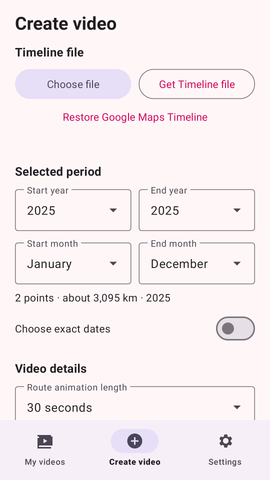
Once you have that file safely saved to your Android download folder, you open up the visualizer app. The very first screen will ask you to point it straight to that specific JSON file you just saved.
Timeline Visualizer APK actually processes everything right there in the moment. The app takes a second to read and index the file. Depending on how many years of daily travel data you have hoarded, this might take a beat. My file was pushing 500 megabytes and my phone chugged for about ten seconds before loading the next screen.
Then comes the fun part where you actually get to play director. You definitely don't want a video of your entire life's history playing at warp speed, so the app asks you to pick a start and end date. I usually just select a specific weekend trip, like when I drove up to the mountains last October.
After that, the app connects to the internet for just a brief moment. It pulls the necessary map background images from a public server based on where you were, stitches those map tiles together, and begins drawing your route on top frame by frame. You just watch the progress bar fill up until you have a finished MP4 video sitting in your phone's camera roll.
📂 Google Takeout vs Maps App Export: The Great Debate
Here is a slightly annoying hurdle I ran into that you should know about. There are actually two different ways to get your data out of Google right now, and they don't always give you the exact same results.
Method one is using Google Takeout on a web browser. You check the box for Location History, wait a few days for the email, and download a massive zip file. The problem I found with Takeout data is that it often just gives you the raw, unfiltered GPS pings. It doesn't always know when you were driving versus when you were walking.
Method two is exporting directly from the Google Maps app on your phone. This method is usually way better because your phone has already processed those raw pings into neat, organized "visits" and "trips". It knows you stopped at a gas station for ten minutes before getting back on the highway.
I highly recommend trying to export directly from the Maps app first. The JSON file it creates is usually much cleaner, which means the video this visualizer app generates will look significantly smoother and more accurate to your actual memories.
✨ Key Features Of Timeline Visualizer APK- The Ones Worth Knowing About
This app packs a surprising punch for something that is completely free and built by a solo developer in their free time. It isn't just a basic converter; there are a ton of deep customization settings. Let's talk about the stuff you will actually end up using.
📱 Local On-Device Video Rendering.
I cannot stress enough how incredibly important this is for your personal safety. Everything happens right on your physical phone hardware. Your sensitive location data never gets uploaded to some shady cloud server in another country, meaning your privacy is locked down incredibly tight.
🎥 Multiple Different Video Sizes.
You don't have to be limited to one boring square format. I shoot mostly in portrait mode (1080x1920) so I can just drop the final video straight into an Instagram Reel or TikTok easily. But you can also choose the full landscape ratio if you want to cast it onto your living room TV to show your family a route from vacation.
🎬 Cool Dynamic Camera Moves.
It doesn't just sit on a static, zoomed-out map where you can barely see the line moving. You can set the virtual camera to physically follow your route as the line draws itself. The dynamic following option makes long, winding road trips look incredibly cinematic, panning and zooming automatically.
⏱️ Total Speed and Pacing Controls.
If you drove straight for 14 hours through 3 different states obviously you don't want a 14 hour long video. You can make the app cut the whole journey down to a fast-paced 30 seconds or 60 seconds clip to keep it super entertaining.
🛡️ Aggressive Junk Data Filtering.
Sometimes your phone's GPS completely freaks out. It bounces off a tall building and suddenly thinks you teleported three miles across town for a single minute. The app has a conservative filter mode that intelligently spots these physically impossible jumps and completely ignores them so your final video route looks smooth and realistic.
⚠️ Raw Data Fallback Support.
Like I mentioned earlier, Google's export tool is notoriously glitchy. Sometimes it completely forgets to label your actual driving trips. If you happen to import a messy file, this app won't just crash. It can fallback to reading your raw GPS pings so you aren't just left staring at a frustrating error screen.
💡 Benefits of Using Timeline Visualizer APK
Timeline Visualizer APK gives you back total ownership of your own memories. That's the biggest win for me. I used to lean on Google for everything. Names of random restaurants I found on a trip six years ago, that one backroad that saved me from brutal highway traffic. Cloud timeline is dead now, and this app is the only simple way I've found to actually see those trips again without wanting to throw my laptop out a window.
If you post travel content, this thing is stupidly useful. I've tried making animated route maps in Premiere before. Hours of keyframes, tiny adjustments, constant frustration. Never again.
Timeline Visualizer APK spits out a finished MP4 in maybe two minutes. You just drop it over your footage and you're done. I wish I had found this before wasting an entire weekend on one map animation last year.
The privacy angle matters too. I hate that my location history sat on Google's servers for years. Who knows who could access that. This app does everything on your phone. Nothing gets uploaded anywhere. That alone sold me.
🛠️ Tips to Get the Most Out of It
Timeline Visualizer APK gets moody when you feed it garbage data. I've botched renders by rushing setup and slamming export without checking anything first. Here's what works for me.
🧹 Clean Up Google Maps First
Spend five minutes in the Google Maps app before exporting anything. Fix the timeline errors on your phone. Google thinks you were at the grocery store when you were actually grabbing coffee next door. Correct those little mistakes in the app first, then export the JSON. Makes the final video so much cleaner.
🎛️ Don't Rush Massive Long Trips
New York to California in 10 seconds? Don't do it. The route line zips across the screen so fast you'll get dizzy. Long multi-day trips need at least 45 to 60 seconds to breathe. Otherwise the viewer can't even process what they're looking at.
📱 Test With Low Resolution First
My phone turns into a toaster when rendering 1080p. Gets hot, battery drops fast. So I render a 480p preview first to check the dates and route look right. Once the preview checks out, I switch to 1080p for the final save. Saves me from wasting time on a bad render.
🎯 Pick The Right Camera Style
Dynamic following camera works great for long road trips. Smooth pans across the highway look fantastic. But walking around a compact city neighborhood? Keep the camera fixed. Zoomed out so people can actually see where you are relative to the streets. Otherwise it's just a blurry mess.
🛑 Close All Your Background Apps
Video rendering frame by frame eats your phone's memory alive. I've had crashes halfway through big renders because I left fifty Chrome tabs and Spotify open. Swipe everything away. Give the app your phone's full attention before hitting go.
📥 How to Download and Install Timeline Visualizer APK Latest Version
The most reliable and safe place to download from I recommend APKview.com as your resource. Random download sites don’t have that security layer of checking APK signatures before publishing.
Step 1: Open the browser on your Android device and go to APKview.com.
Step 2: Type “Timeline Visualizer APK” in the search box.
Step 3: Find the Latest Version of APK file Available Make sure it is from a trusted source on the site.
Step 4: Choose the download button. Your device might prompt you to confirm if you want to download the file – confirm if you want to download it.
Step 5: This is where most people get it wrong. You must allow installations from Unknown Sources. On most Android phones, go to Settings > Security > Unknown Sources and toggle it on. Some new phones may ask you to give permission for your browser only – just do what it tells you on your screen.
Step 6: Tap the downloaded APK file. It’s usually sitting in your Downloads folder.
Step 7: Click on Install and wait for few seconds. It's fairly fast.
Step 8: When done, open the app and sign up or login, if you have an existing account.
Just a Note : If you get an error, then the file is probably corrupted or you downloaded the wrong version. Download it again or check your Android version to see if it is supported.
🔒 Is It Safe to Use? Here's the Honest Take
I'm usually that guy telling people to protect their location info. Your timeline knows where you crash at night, where you clock in for work, everywhere between. Handing that file to some random app sounds nuts.
But this one doesn't bug me. Whole thing is open-source with an MIT license. Devs can dig through the source code whenever they want. If anything shady was going on, like some hidden tracker shipping your home address off somewhere, someone on Reddit or GitHub would've caught it already. Those people find everything.
Don't need to trust me on this. Test it yourself in thirty seconds. I put my phone on airplane mode, killed Wi-Fi and mobile data, after opening the app one time so the map could load. Still read my massive JSON file and exported a clean MP4 with zero internet.
Hard to steal data when the phone can't connect to anything. That's just common sense.
Only thing I'd say is grab the original install file from APKview.com or the actual GitHub page. Skip the sketchy forum links offering "premium unlocked" versions. That's where things get ugly.
⚖️ Pros and Cons — The Unfiltered Take
Nothing in the tech world is perfect. I use this thing all the time, but it still has a few little quirks and annoyances that drive me slightly crazy. Here is the real, unfiltered breakdown of what you are getting into.
✅ Pros:
- It doesn't cost a single dime to use, and there are absolutely zero annoying subscription pop-ups begging for your credit card information every time you open it.
- You get total, uncompromising offline privacy. Your sensitive location data stays safely isolated on your physical device memory at all times.
- The exported MP4 videos actually look highly professional and polished, making them perfect for tossing straight onto social media without any extra editing required.
- You are given a massive amount of control over the final product, including the video ratio, camera tracking style, export speed, and resolution quality.
- You do not have to link your personal Google account to it at all to make it work, which adds another great layer of security.
- It is currently, without a doubt, the absolute best way to rescue and actually enjoy your data following Google's recent, frustrating timeline restrictions.
❌ Cons:
- Having to manually dig into your settings to export your JSON data from Google every single time you want to make a video is a clunky, annoying extra step.
- It turns older, less powerful Android phones into literal hand warmers when rendering high-resolution video files, severely draining the battery in the process.
- If Google's internal export tool gives you garbage, unorganized data, the final video route is going to look a bit erratic and jumpy no matter what settings you use.
- There is no built-in way to trim the length or edit the colors of the video inside the app; you still need a completely separate gallery editor for that kind of stuff.
- You kind of have to baby the app and physically keep it open on your screen while it renders, otherwise your phone's operating system might aggressively kill the background process to save memory.
🏁 Final Verdict — Is It Worth Downloading?
Timeline Visualizer APK is an absolute lifesaver if you are currently caught up in the incredibly frustrating Google location history transition mess.
When I realized I could not easily see my old cross-country road trips on a big, interactive map anymore, I was pretty bummed out. This app completely solved that specific issue for me, without having to give up my own privacy by uploading my files to some sketchy third party website.
Yes, dealing with raw JSON files, manual exports, and sideloading apps is a bit nerdy and tedious. It certainly isn't as seamless and magical as the old cloud-based Google Timeline used to be before they changed everything in the name of security.
But considering this is a completely free, community-driven open-source tool that takes a pile of unreadable code and spits out incredibly cool, cinematic animated travel videos entirely offline, the small trade-off in convenience is absolutely worth it.
If you have a bunch of old, amazing travel data sitting in a useless zip file on your phone right now, do yourself a massive favor. Go grab the latest version of the app, feed it your last big vacation, and watch it draw your route. It is surprisingly satisfying to watch your memories come back to life.








