
I'll be honest — the first time I had to look up a KBLI code for a business registration, I had no idea what I was doing. The BPS website had content buried in a freely accessible pdf with thousands of entries and no real search and displaying that looked like it had not been modified since 2014.
Nothing new there. Anyone who has been involved with Indonesian business registration, OSS fillings, HR documentation or customs paperwork has probably faced that wall too. You know the code exists. You know you need the right one. You just can't find it without burning through more time than it should take.
Sibaku Mobile APK is what BPS built to fix that. Free, official, runs on Android and iOS, and puts the full KBLI, KBJI, and KBKI classification databases on your phone — searchable in seconds. I've used it for a while now and it's one of those things that you don't realize until you remember what it was like to do it the old way.
In this guide I’ll explain what the app actually does, how it works in practice, how to install it and give a frank assessment of its strengths and weaknesses.
📌 What Is Sibaku Mobile? — And Why Did BPS Even Build This?
Sibaku APK is an acronym for Sistem Informasi Baku which means in English Standard Information System. It is produced by the Badan Pusat Statistik, Indonesia’s Central Statistics Agency. Not a clone of BPS data from a third party, it’s the actual institution that owns this data that built it and publishes it themselves.
Before Sibaku Mobile, there was SPK (Sistem Pencarian Kode). It did the job, technically. But the interface was clunky, the data felt stale, and you would not describe using it as a smooth experience by any measure. Sibaku Mobile replaced it — better design, fresher data, more features.
The app covers three classification systems that come up constantly in Indonesian business and regulatory work. KBLI handles business field classifications — basically, what type of business you operate. KBJI covers occupational classifications — your job title, standardized. KBKI covers commodity classifications — goods or products being traded or reported.
Getting any of these wrong has real consequences. Wrong KBLI on an OSS registration means your business category is misclassified, which affects what permits you qualify for. Wrong KBJI in HR records creates discrepancies that surface during audits.
Wrong KBKI on a customs declaration and your shipment sits at the border longer than it should. None of those are hypothetical — they happen when people guess at codes instead of verifying them.
That's the actual reason this app exists. Not to be impressive. Just to make sure people get the right code without spending an afternoon on it.
🎮 How Does It Work? — What Using It Day-to-Day Actually Looks Like
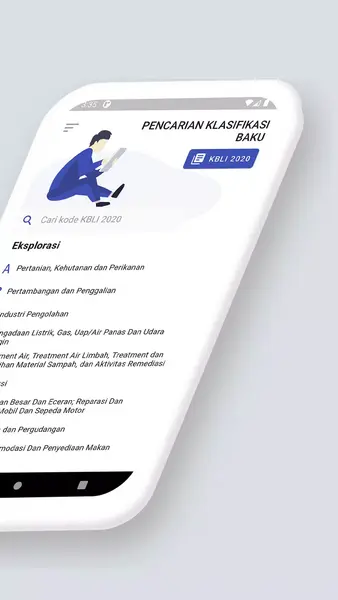
Open the app and you’ll see three options on the home screen — KBLI, KBJI, KBKI. Choose the one you need and you’re halfway there.
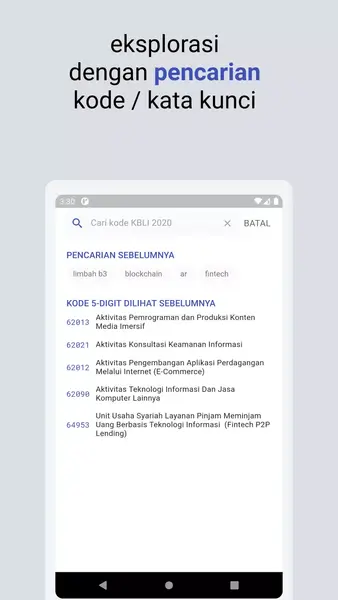
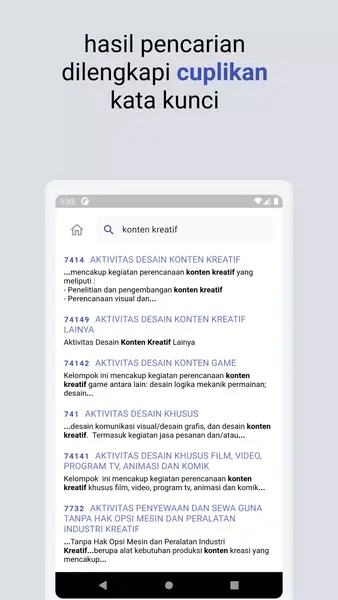
From there you have two options. Most people search by keyword. Type something like "restaurant" or "software" or "freight transport" and the app returns a list of matching codes with full descriptions. Usually you'll find what you need in the first few results. If your term is too vague you get a long list to sort through, so being reasonably specific helps — but it doesn't need to be exact.
The other option is browsing the code tree — tapping through a hierarchical structure from broad categories down to specific sub-codes. Slower than searching but handy when you are not too sure what keyword to use or you want to see the whole landscape of a particular classification area.
When you find the right code, read the full description to make sure it fits your situation, then copy it, share it to another app, or save it for later. All of that is one or two taps. The copy-and-share function is one of those things that sounds minor until you're in the middle of filling out a government form on your phone and you just need the number quickly without switching apps and retyping.
Search history keeps recent lookups accessible. If you're working on a project that keeps coming back to the same handful of codes, that saves more time than you would think. The app also works offline once the data is loaded — genuinely useful if you're doing fieldwork or in an area with bad signal.
One thing that surprised me: browsing the classification tree is actually a pretty good way to learn how BPS structures its categories. Spend ten minutes exploring a section and you get a much better feel for the system than reading about it ever gives you.
✨ Key Features of Sibaku Mobile APK — The Ones Worth Knowing About
🔍 Keyword Search That Doesn't Require Prior Knowledge
You don't need to understand the BPS classification structure before you start. Type something descriptive about your business or job and the app handles the matching. It won't nail every vague term perfectly, but it's fast and functional — a genuine upgrade from ctrl+F in a government PDF.
🗂️ KBLI, KBJI, and KBKI All in One Place
Before this app, these three systems meant separate resources, separate downloads, separate tools. Having all three searchable through the same interface cuts a lot of friction. Most people who regularly use one system end up needing the other two at some point anyway.
📖 Full Code Descriptions, Not Just Short Labels
Most lookup tools give you a code number and a two-word label and leave you to figure out if it actually applies. Sibaku Mobile shows the complete official description. That's where you find out whether your specific situation is included or excluded — which matters a lot before you submit anything official.
📋 Copy, Share, and Save in a Couple of Taps
One tap to copy, direct share to other apps, a save function for codes you reference repeatedly. Small features that add up significantly if you're doing this kind of lookup regularly rather than once.
⏱️ Search History That Keeps Your Recent Work Accessible
The app logs recent lookups. For ongoing work involving the same codes across days or weeks, you're not retyping searches constantly. Simple feature, but it's one you'd miss immediately if it wasn't there.
📂 Browsable Classification Tree for Exploratory Searches
If search isn’t helping you find what you need, then you can browse from broad industry categories to specific sub-codes at your own pace using the hierarchical browse structure. Good for when you want to see what’s on offer in a category, rather than looking for something specific.
📱 Interface That Doesn't Look Like a Government App From 2012
SPK had that look. Sibaku Mobile doesn't. Layout is clean, navigation is logical, text is readable. It won't win any design awards but it stays out of your way, which is what you actually want from a reference tool.
🔄 Data Updated Directly by BPS
Classification standards do get revised. When they do, the app gets updated. You're not relying on someone else's interpretation of current data or a cached document that might be two years old.
❓ FAQ Page Built Into the App
There's a built-in FAQ that addresses common questions about how the classification systems work and how to use the search features. Worth reading if you're new to BPS systems — covers things people usually have to track down separately.
💡 Benefits of Using Sibaku Mobile — What Actually Changes When You Have It
Time is the obvious one. What used to take 20 minutes now takes under a minute. That's not an estimate — it's just what happens when you replace PDF navigation with a proper search app. If you do this a few times a month, the hours genuinely add up.
For business registration through OSS, you need a KBLI code early in the process and it determines your business category, which affects what permits and licenses you qualify for. Submitting the wrong one and correcting it later is not a smooth process. Confirming the right code before you open the OSS portal eliminates that problem entirely.
HR teams referencing KBJI for official job documentation have a similar dynamic. Wrong occupational classification in official records creates inconsistencies that eventually need to be corrected. Verifying the right code takes three minutes in the app. Fixing incorrect records in government systems takes considerably longer.
For customs and logistics, KBKI accuracy in trade documentation is directly tied to clearance speed. An incorrect commodity classification can hold up a shipment or trigger additional inspection. Having a reliable, authoritative reference tool available during documentation review is practical risk management, not extra work.
There's also a cumulative benefit that takes a few months to notice. Reading full code descriptions regularly, rather than just grabbing numbers, builds a working understanding of how BPS organizes its classification systems. After a while you start knowing which category to look in before you even search — and that makes everything faster.
🛠️ Tips to Get the Most Out of It — What Experience Teaches You
💾 Save Codes the Moment You Confirm One Is Right
Don't rely on search history to preserve it. When you've verified a code fits your situation, save it immediately. Takes two seconds, and the next time you need it is instant rather than another search.
🔤 Be Specific With Keywords, But Not Rigid About It
"Jasa" returns too much. "Jasa pengiriman barang" gets you somewhere. But if your first attempt doesn't surface what you need, just rephrase and try again. The app handles synonyms reasonably well — you don't need to match BPS's exact terminology to get useful results.
📤 Use Share Instead of Retyping
When you need to move a code into a form or send it to a colleague, use the share function rather than reading and retyping it. The share output includes the code and its full description, which saves the follow-up question of what the code actually covers.
🔄 Keep the App Updated
BPS does revise classification standards. An outdated app version might not reflect current codes. When an update notification comes in, install it — especially before any compliance-sensitive submissions.
📋 Read the Full Description Before Using a Code in an Official Submission
Even when the code label looks correct, read the description before you commit it to a form. Some codes include specific activities you might not expect. Some explicitly exclude things the label implies. The description is where the actual boundaries live.
🌿 Switch to Browse Mode When Search Returns Too Many Results
If a keyword is coming back with 50 results and nothing stands out, go to browse mode and navigate to the relevant industry category. Seeing the full structure of a classification area often clarifies which sub-category fits your situation better than trying another keyword would.
📥 How to Download and Install Sibaku Mobile APK Latest Version
The most reliable and safe place to download from I recommend APKview.com as your resource. Random download sites don’t have that security layer of checking APK signatures before publishing.
Step 1: Open the browser on your Android device and go to APKview.com.
Step 2: Type “Sibaku Mobile APK” in the search box.
Step 3: Find the Latest Version of APK file Available Make sure it is from a trusted source on the site.
Step 4: Choose the download button. Your device might prompt you to confirm if you want to download the file – confirm if you want to download it.
Step 5: This is where most people get it wrong. You must allow installations from Unknown Sources. On most Android phones, go to Settings > Security > Unknown Sources and toggle it on. Some new phones may ask you to give permission for your browser only – just do what it tells you on your screen.
Step 6: Tap the downloaded APK file. It’s usually sitting in your Downloads folder.
Step 7: Click on Install and wait for few seconds. It's fairly fast.
Step 8: When done, open the app and sign up or login, if you have an existing account.
Just a Note : If you get an error, then the file is probably corrupted or you downloaded the wrong version. Download it again or check your Android version to see if it is supported.
🔒 Is It Safe to Use? Here's the Honest Take
Yes, it's safe. And that's not just a line to move past the question.
The app is published by Badan Pusat Statistik itself — through verified developer accounts on both Google Play and the Apple App Store. Both platforms have review processes that apps go through before being listed. A government agency shipping malicious code through official channels would be a significant and very public problem. That's not nothing as a deterrent.
The permission requests are also worth looking at. The app doesn't ask for your location, contacts, camera, or microphone. For a reference lookup tool, those requests would be red flags. Sibaku Mobile asks for what it needs to function and nothing more.
Still not sure? Upload any APK file to VirusTotal (virustotal.com) before installing. It scans against 70+ antivirus engines, takes under a minute, and costs nothing. For official Sibaku Mobile APKs from verified sources, you'll find nothing concerning.
The real risk with APKs isn't the official version — it's downloading from random, unverified sites where modified versions sometimes circulate. Stick to Play Store, App Store, APKview.com, or APKPure and that risk effectively disappears.
🌐 Who Actually Gets Real Use Out of This App?
The user base is wider than most people assume. This isn't a niche tool for government statisticians.
Business owners going through OSS registration are probably the most common users. KBLI is one of the first inputs the system asks for, and which code you enter determines your business category and permit eligibility. The app lets you confirm the right one before you submit rather than guessing and hoping.
Accountants and business consultants handling registrations for multiple clients use it constantly. When you're dealing with a manufacturing client, then a food service client, then an IT consultancy — all in the same week — having a fast, reliable lookup tool on your phone is just part of the workflow.
HR and payroll teams reference KBJI for official job documentation and government workforce reporting. The occupational classification codes need to be precise, and the app makes verification quick rather than an exercise in guesswork based on job title alone.
Freight forwarders, customs brokers, and logistics teams deal with KBKI in trade documentation. Commodity classification errors create real delays at customs. Having an authoritative reference tool available during the documentation process is straightforward risk management.
Researchers and students working with BPS data also find it useful — both for finding codes and for understanding the classification logic, which comes up regularly in economic and statistical work.
⚖️ Pros and Cons — The Unfiltered Take
✅ Pros:
- Completely free — no subscription, no locked features, no premium tier.
- Official BPS data, straight from the source. Not scraped, not someone's interpretation, not outdated.
- All three classification systems in one app — genuinely useful in practice.
- Works on Android and iOS.
- Offline access once the data is loaded.
- Clean, functional interface — nothing fancy but nothing frustrating.
- Copy, share, and save features that slot into real-world workflows.
- Data gets updated when BPS classification standards change.
- Lightweight. Doesn't eat storage or slow your phone down.
❌ Cons:
- Only relevant within the context of Indonesian government systems and BPS classifications. If that's not your world, there's no reason to have it.
- The classification terminology can be dense for first-time users who aren't already familiar with how BPS organizes its data.
- No dark mode in current versions. Comes up in user feedback regularly.
- Search quality drops with vague or overly broad keywords — requires some trial and error to find the right term.
- It's a lookup tool and nothing more. It doesn't connect to OSS, doesn't pre-fill forms, doesn't link out to other BPS systems. You still handle all of that separately.
🏁 Final Verdict — Is It Worth Downloading?
If your work involves Indonesian business registration, HR documentation, customs, compliance, or anything that touches BPS classification codes — yes, get it. It's free, it's accurate, and it cuts out a task that used to take way longer than it needed to.
It's not a remarkable app in any flashy sense. It does one specific thing and it does it well. The alternative — hunting through government PDFs or navigating the BPS website every time you need a code — is a frustrating waste of time that this app just eliminates. That's the pitch. It's a simple one, but it holds up.
Version 3.2.1 is noticeably better than earlier releases, and the fact that BPS keeps updating it means this isn't software someone built once and walked away from. The addition of SDS search, the FAQ section, the improved interface — these are signs of an active development cycle, which matters when you're relying on something for accurate official data.
If I had to sum it up simply: the app does one thing, does it well, costs nothing, and the only people it's not useful for are people who genuinely never need to look up BPS classification codes. If you're in that second group, skip it. If you're in the first group and you don't have it yet — you're making a regular part of your job harder than it has to be.
Download Sibaku Mobile APK from APKview.com, Google Play, or the Apple App Store. Version 3.2.1, developer Badan Pusat Statistik. That's all there is to it.








