
Look, I get it. You're stuck. You've got a Samsung phone in your hand that might as well be a brick and you're clicking through page after page trying to find something that actually works.
Maybe you factory reset your own device and now it wants a password from an email account you haven't touched in four years. Maybe you bought a secondhand phone and the previous owner vanished without removing their stuff.
Now you're staring at that blue Google verification screen wondering if you just wasted your money. Somewhere in the late-night googling you probably typed in ZeroKnox Removal APK and landed on a dozen sketchy sites that all look the same.
I've been fixing phones out of a small shop for about six years now and I've seen every tool, every trick, every scam. Most of them are junk. A few actually deliver.
The ZeroKnox thing falls in the useful category but there's a lot of garbage information floating around about it. People call it an APK which it isn't. People download it from random links and end up with malware.
People run it without knowing what they're doing and brick their devices. So I'm gonna break down what this tool actually is, where to grab it safely, and whether it's gonna fix your problem or just add new ones. No fluff. Just what I've learned from actually using it.
📌 What Is the ZeroKnox Removal Tool, Really?
So let's kill the biggest myth right now. There is no ZeroKnox Removal APK. I know that's what you searched for. I know there are websites that claim to offer exactly that with big download buttons and fake testimonials.
They're lying to you. The real tool is a Windows program. You install it on a laptop or desktop, you plug your locked Samsung into that computer with a USB cable, and the software does the work from there.
It doesn't run on the phone itself. It never has. The thing was built as a technician's utility for bypassing Factory Reset Protection and Knox Guard locks on Samsung devices. Internally it uses ADB , the Android Debug Bridge.
This is basically a communication channel between a computer and an Android phone that developers use for testing. The tool takes advantage of that channel to send commands that wipe the lock data. 1.6 and 2.4 are the floating around versions that actually work.
They support Samsung phones from Android 8 to 16, which is pretty much every device you are likely to come across. This looks like an interface designed in 2008. It’s not slick, it’s not pretty, but it does work.
Keep in mind that you will need a PC to do this. If you are on a website that is trying to send you one APK file and telling you to install it on your locked phone, close that tab right away. You are about to be hacked or infected.
🎮 How Does the ZeroKnox Removal Tool Actually Work?
Ok let me tell you what is going on behind the scenes without getting too technical. What happens is that when Samsung phones get FRP locked they store the previous Google account info in a protected part of the storage.
Even a factory reset doesn’t get rid of that data. Phone boots up and sees that old account info and wants you to verify it before you can proceed. That's the screen you're stuck on. What this tool does is pretty straightforward once you understand the setup.
First you put your phone into a state where it can accept ADB connections. Usually this means sitting on the language selection screen or the emergency dialer. You connect the phone to your PC and the tool tries to force ADB to enable.
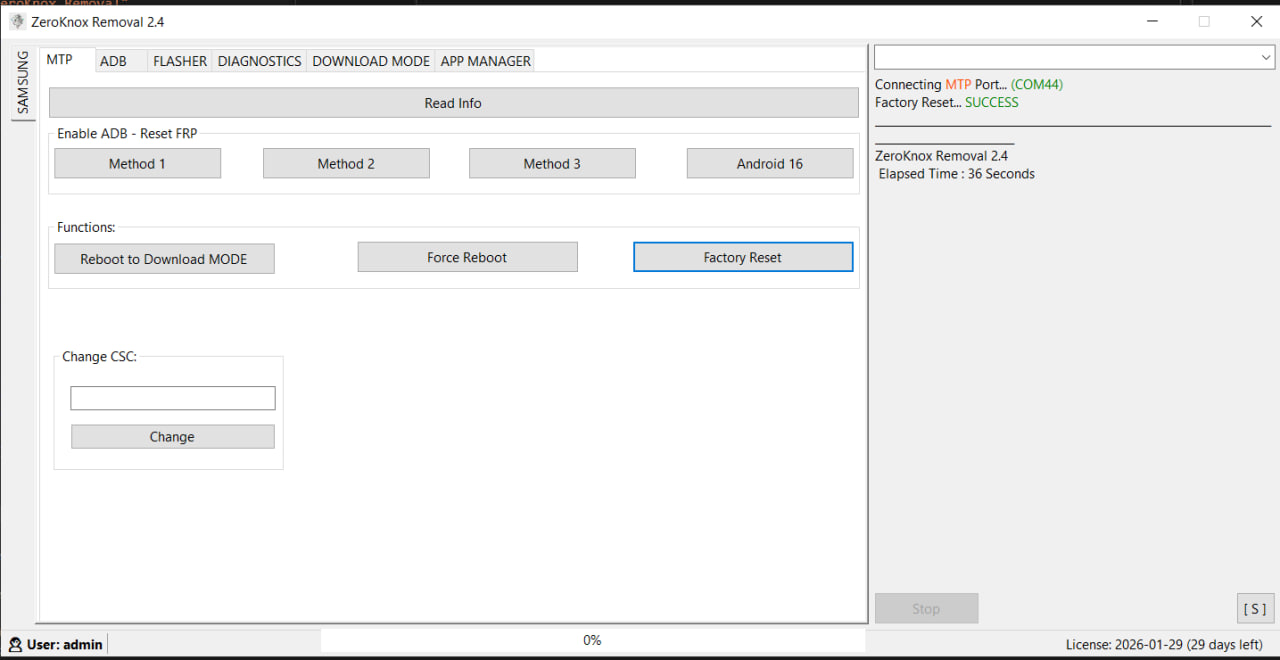
This is the tricky part because different security patches close different loopholes. The software includes multiple methods for a reason. Method 1 might fail completely. Method 2 might hang. Method 3 might connect but drop after a few seconds. You keep cycling through until one sticks.
Once that ADB connection is solid, the tool pushes commands that target and delete the files holding the FRP data. Phone reboots and suddenly instead of asking for the old account, it lets you start fresh. There is no magic.
It’s just automating ADB commands that you could technically type yourself if you know what to target and have the patience to do it manually. The tool just makes it accessible to people who don't want to learn command-line debugging.
✨ Key Features Of ZeroKnox Removal Tool - The Ones Worth Knowing About
The program crams quite a bit into one package. Here's what you'll actually find yourself using.
🔓 FRP Lock Removal.
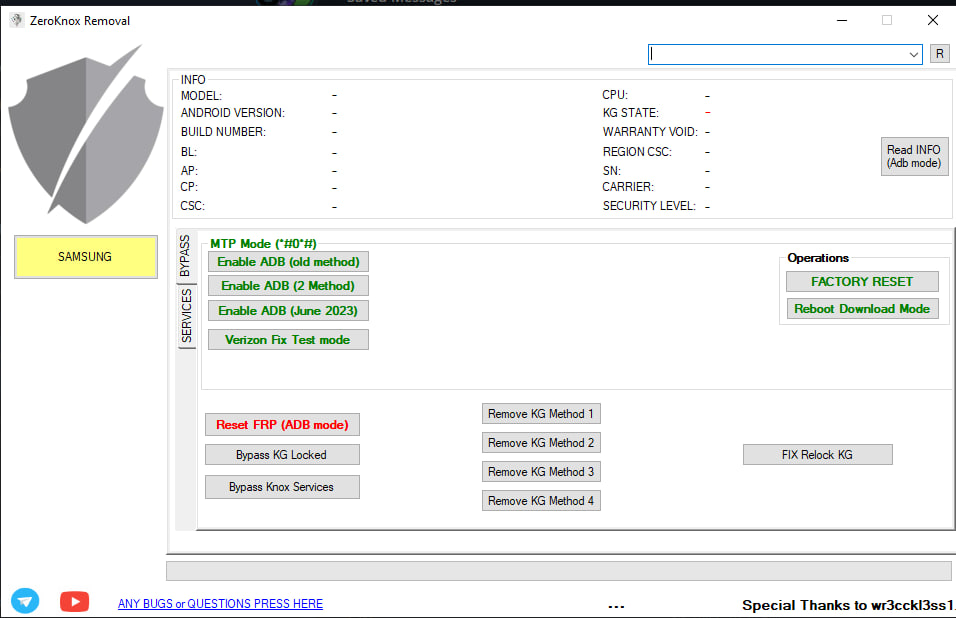
This is why most people download the tool. Factory Reset Protection lock got you stuck at the Google verification screen after a reset. The tool bypasses this by using ADB to wipe the FRP partition.
Works on most Samsung models though newer security patches sometimes need a few attempts with different methods. I've used this feature hundreds of times in the shop. Success rate is high but not perfect.
🛡️ KG Lock and KnoxGuard Bypass.
Samsung's Knox security system has a feature called Knox Guard. It's mostly used on financed devices. When someone stops paying, the carrier flags the phone and Knox Guard locks it down remotely.
The tool claims to bypass this by blocking the phone's communication with Samsung's activation servers. Developer puts the usual "educational purposes only" disclaimer on it which you should take seriously. Don't use this on devices you don't own.
⚙️ Change CSC and Region Code.
Here's one people sleep on. Samsung phones have a Country Specific Code buried in the firmware that controls what features are enabled and when you get software updates. You can use the tool to switch your CSC to a different region and pull updates months before they hit your country. I flipped an Indian device to UK firmware once just to get One UI 6 early. Worked without any issues. Services charge money for this. The tool does it free.
📱 MTP, ADB, and Flashing Modes.
The interface is split into different tabs for different tasks. MTP Mode works through the file transfer protocol when ADB won't cooperate. ADB Mode is the main one for bypassing locks.
Flashing Mode is basically Odin built into the same program. You can flash stock firmware, custom ROMs, recovery images, whatever you need. Saves you from downloading and opening separate software.
📊 Diagnostics and App Manager.
Didn't expect to find this in an unlocking tool but it's genuinely handy. You can pull up battery health stats, CPU temperature, memory usage. The App Manager lets you strip out carrier bloatware and Samsung pre-installed junk that's normally locked down. I removed about twenty useless apps from a customer's A series phone last month. Freed up noticeable storage and made the thing run smoother.
⚡ Reboot and Download Mode Shortcuts.
Such a small feature but I use it constantly. Instead of fumbling with button combinations to enter Download Mode or Recovery, you click one button and it happens. Power plus volume down plus maybe Bixby, wait no that's wrong, start over. So annoying. This alone makes me keep the tool around even when I'm not unlocking anything.
🔧 Smart Firmware Flashing.
Manual flashing means carefully selecting BL, AP, CP, and CSC files in specific slots. One wrong file in one wrong slot can permanently brick a device. This tool scans your firmware folder, identifies each file type, and assigns them correctly. It also gives you the option to ignore MD5 checksum errors which has rescued me multiple times with firmware downloads that had minor corruption but were otherwise perfectly usable.
💡 Benefits of Using ZeroKnox Removal Tool
The free part is the obvious benefit. Most FRP bypass tools operate on credit systems. You pay per device or you pay monthly. If you're running a repair shop doing multiple unlocks a week, those costs pile up fast.
Having a free option that covers most Samsung models is a no-brainer. Another thing I appreciate is consolidation. Before I found this tool my desktop was a mess of different programs. One for FRP, one for flashing, one for diagnostics, one for CSC changes.
Constantly switching between them, dealing with driver conflicts, one program not releasing the device properly so the next one can't connect. Annoying. Having everything in one interface streamlines the workflow.
For regular people just trying to fix their own phone, the benefit is saving money. Repair shops charge sixty to eighty bucks for an FRP bypass that takes ten minutes. You can handle it yourself if you're willing to learn the basics.
There's a learning curve, no question about it. Your first time messing with ADB and drivers will probably involve some swearing. But once you figure it out, you're set for any future lockouts.
The diagnostics and app management features are nice bonuses too. Being able to check battery health or strip bloatware without separate tools is useful.
🛠️ Tips to Get the Most Out of It.
Things I figured out through trial and error. Learn from my mistakes.
💻 Disable Your Antivirus Before Anything Else
Windows Defender will eat the executable file the moment you extract the zip. This happens every single time and it's not because the tool contains malware. It's because the tool behaves like hacking software.
It exploits ADB, it modifies system partitions, it sends commands that normal programs never send. Your antivirus sees that pattern and panics. Go into Windows Security settings, turn off real-time protection, add your download folder as an exclusion. Just remember to turn it back on when you're done. I've forgotten before and left my system unprotected for days.
🔌 The USB Cable Matters More Than You Think
I've wasted entire afternoons troubleshooting connection failures only to realize I was using some cheap gas station cable that couldn't handle data transfer properly. ADB is picky about connection stability.
Use the original Samsung cable if you still have it. If not, buy a proper data cable from a brand you've actually heard of. Those thin charging cables that came with your vape or Bluetooth speaker won't work.
✅ Try Every Single ADB Method
Don't click Method 1, watch it fail, and assume the tool is broken. I've had phones where the first three methods did nothing and Method 4 connected instantly. Security patch dates determine which exploits are still open. You need to cycle through all available methods. Disconnect the phone, reconnect, try the next one. Takes patience but that's just how it works with newer devices.
🛑 Don't Touch the Phone During the Process
When the FRP reset kicks in, your phone is going to do weird things. It might reboot several times. Screen might flash black, show the Samsung logo, go black again, vibrate randomly. Just leave it alone. Hands off.
Do not push any buttons, leave the cable plugged in. Look for a success message in the log window of the tool. Yanking the cable mid-process because you got impatient is how you end up with corrupted firmware and a much bigger problem.
🧑💻 Right Click, Run as Administrator, Every Time
You can skip this step but the tool might not have Windows permissions to access system files or change driver settings. You get cryptic error messages that make you think there’s something wrong with the software when it’s just Windows silently blocking stuff. Double-click the executable and choose Run as administrator. Do it habitually.
📥 How to Download and Install ZeroKnox Removal Tool Latest Version
Don't grab this from random forums packed with popups and fake download buttons. I get mine from APKview.com which is a known repository in the GSM repair world. Here's the process.
Step 1: Head to APKview.com and Search
Open your browser and go to APKview.com. Use their search bar to look up ZeroKnox Removal Tool. You'll see a few versions listed. Grab the latest one available, which should be v2.4 as of right now. Ignore the giant banner ads screaming DOWNLOAD NOW. Those are not the real links.
Step 2: Download the Zip Archive
Click the actual download button on the page. You'll get a compressed folder named something like ZeroKnox_Removal_Tool_v2.4.zip. It's roughly 70 to 100 megabytes. Save it to your desktop or somewhere you can find it easily.
Step 3: Extract Using WinRAR or 7-Zip
Right-click the zip file and choose extract here or extract to folder. It'll prompt you for a password. The standard password that works for most of these GSM tools is DIVINEDIGITAL. If that fails, scroll through the description on the APKview download page. They usually put the password there.
Step 4: Install Samsung USB Drivers
This step is mandatory. Google Samsung USB drivers and download them from the official Samsung Developer website. Don't grab them from some third-party driver site. Install them, then restart your computer. Some versions of the ZeroKnox tool have a driver installer included but I prefer the official ones because they cause fewer conflicts.
Step 5: Pause Antivirus and Re-Extract
Windows Defender might have already deleted the executable from your extracted folder. Pause your real-time protection. Check the folder. If the .exe file is missing, extract the zip again. The executable is usually named something obvious like ZeroKnox_Removal_Tool.exe.
Step 6: Launch and Connect Your Phone
Right-click on the .exe file and select Run as administrator. Now set your Samsung phone to the correct starting mode. Usually the language selection screen or the emergency dialer will work. Connect your phone to your computer. In the tool, go to the ADB Mode tab, click Enable ADB and wait for confirmation in the log window. Once ADB shows as active, click the button for what you need. Reset FRP, bypass Knox, whatever your situation calls for. Phone should reboot on its own and the lock should be gone.
🔒 Is It Safe to Use? Here's the Honest Take
People ask me this constantly and I always struggle to give a simple yes or no. The software itself isn't malware. It's not stealing your passwords or mining crypto in the background. I've scanned it on clean machines and the detections are all behavioral flags, not actual malicious code. It gets flagged because it does things that hacking tools do.
It exploits debugging protocols, it modifies protected partitions, it sends commands that legitimate consumer software would never send. Antivirus programs see that pattern and quarantine it immediately.
That part is normal and expected. But here's what keeps me up at night when I recommend this to people. You are deliberately disabling your security to run a downloaded executable from the internet.
If you downloaded the file from a sketchy Google Drive link or sketchy forum instead of a trusted source like APKview.com, I can't really speak to what's actually in there. These tools are often repackaged by people with malware added.
It's a real risk. On the device side, there's also danger. If you're using the flashing feature and you select the wrong firmware files, or if your USB cable disconnects during a critical write operation, you can permanently destroy the phone.
Not soft-brick where you can recover it. Properly dead. This tool assumes you have basic knowledge of what you're doing. It's not a consumer app with safety rails and undo buttons. It’s technically only okay to use this on devices you own or have express permission to unlock.
It is not legal and not ethical to bypass FRP on a phone you found in a parking lot or bought without verifying ownership. Don’t be that person.
⚖️ Pros and Cons — The Unfiltered Take
Here's the real breakdown with no marketing spin.
✅ Pros:
- Completely free. No credits, no subscriptions, no surprise charges.
- Combines FRP bypass, Knox removal, CSC changing, and firmware flashing into a single program.
- Covers a huge range of Samsung devices from older models to the newest Android 16 builds.
- Diagnostic tools and the app manager are genuinely useful even outside of unlocking.
- Widely used in repair communities which means there's plenty of discussion and support online.
❌ Cons:
- Antivirus software flags and deletes it immediately. You have to lower your security to use it.
- The interface is dated and some features require trial and error to figure out.
- Real risk of permanent bricking if something goes wrong during flashing.
- Not friendly to beginners who have never touched ADB or installed phone drivers.
- Legally questionable when used on devices without proper authorization.
🔧 Troubleshooting Common Headaches
If the tool simply sits there not detecting your phone the first thing to check is Device Manager on your PC. Check for any device with a yellow triangle warning. That’s a driver issue. Uninstall anything that pops up there, reinstall the Samsung USB drivers and reboot your PC.
That fixes the detection issue most of the time. If you see ADB Unauthorized in the log window, disconnect the cable and try a different ADB enable method. Sometimes just switching USB ports solves weird connection problems.
Avoid USB hubs and front panel ports on desktop computers. Use the ports on the back that connect directly to the motherboard. They provide more stable power and data transfer. If a flash operation fails with an MD5 hash error, check the option to skip MD5 verification in the flashing settings.
I've recovered several soft-bricked phones this way using firmware files that had minor corruption but were otherwise intact. If your phone gets stuck in a boot loop after an FRP reset, boot into Recovery Mode using the tool's shortcut and do a cache partition wipe. That resolves post-unlock boot issues in most cases.
🏁 Final Verdict — Is It Worth Downloading?
If you're locked out of a Samsung phone that belongs to you and you have access to a Windows computer, yeah download it. The tool has saved me countless hours and a solid amount of money over the years. For repair technicians it's basically essential at this point.
Free utility that handles multiple jobs and works across most Samsung devices you'll run into. But I’ve got to be honest about who needs to stay away from this thing. If the thought of disabling your antivirus frightens you, or you've never installed a phone driver or heard of ADB before, you're in for a bumpy ride.
This is not a finished app with a support team and helpdesk. It's a scrappy technician tool built by people who assume you already know the fundamentals. The search for a ZeroKnox Removal APK probably led you here, but now you know the reality.
It's PC software. It requires a USB cable, patience, and the willingness to troubleshoot when things don't work on the first try. But when it works, it does the job cleanly, and you can save yourself a trip to the repair shop.
Just make sure that phone you have in your hands is yours. Tools like this walk a fine ethical line and it's on you to stay on the right side of it.








