
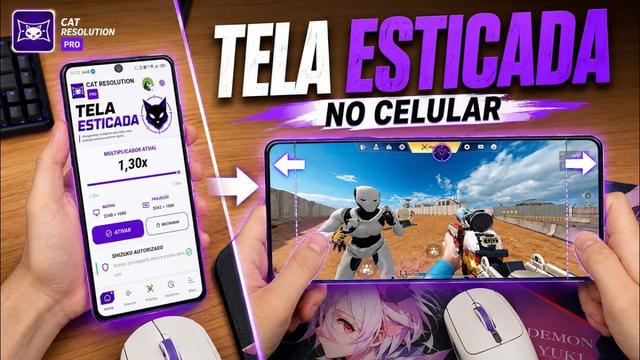
Cat Resolution Pro APK меня сильно удивил, когда я впервые накатил его на свой старенький OnePlus. Мобильные игры сейчас выглядят потрясающе — картинка почти консольная —, но мой телефон превращается в кипятильник уже через десять минут матча в Warzone. Производители обожают ставить экраны 1080p или 1440p в смартфоны со средними процессорами, при этом в самой системе нет никаких штатных настроек, чтобы просто сбросить разрешение ради стабильного фреймрейта.
В районе 2017 года настройка DPI означала разблокировку загрузчика, прошивку Magisk и постоянный страх получить «кирпич». Ошиблись строчкой в build.prop? Придется провести весь вечер за вводом команд fastboot. Сейчас же сработавший триггер Play Integrity моментально отключает банковские приложения и бесконтактную оплату. Тратить на это нервы ради пары лишних кадров в секунду просто бессмысленно.
Cat Resolution Pro APK избавляет от этих проблем. Вы получаете низкоуровневую настройку экрана вообще без root-прав. Ниже я подробно разберу, как именно масштабируется картинка, что происходит в Window Manager на системном уровне и насколько это удобно в повседневном использовании.
📌 Что такое Cat Resolution Pro APK?
Cat Resolution Pro APK — это, по сути, чистая оболочка без рекламы для внутренних команд отображения Android. Если вы сидели на XDA или форумах по кастомизации, то наверняка помните старую утилиту Purr от разработчика Draco.
Эта Pro-сборка из Telegram-каналов просто приводит в порядок интерфейс, добавляет готовые пресеты и вырезает лишний мусор. Приложение выполняет одну задачу: быстро меняет разрешение экрана и значение DPI на лету.
Cat Resolution Pro APK не имеет ничего общего с бесполезными приложениями для «очистки оперативной памяти» из Google Play, которые просто выгружают фоновые процессы, а система через секунду запускает их обратно.
Утилита взаимодействует напрямую с SurfaceFlinger и дисплейным сервером. Она заставляет видеочип рендерить картинку в меньшей сетке пикселей, после чего аппаратный скалер растягивает изображение под физическую матрицу.
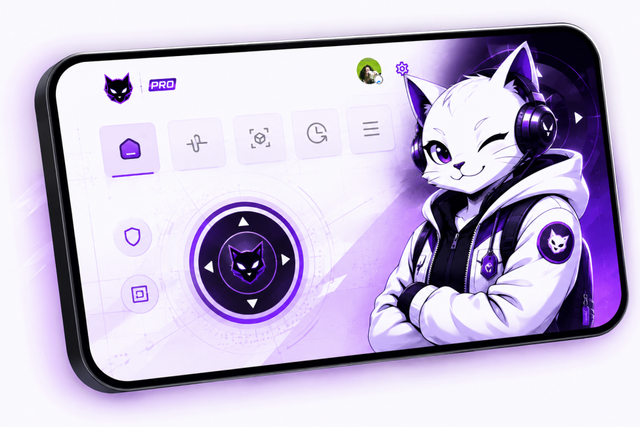
Да, в интерфейсе действительно есть забавный мультяшный кот, который подмигивает при запуске. На первый взгляд выглядит как любительский проект, но за этой анимацией скрываются вполне серьезные системные API уровня разработчика.
🎮 Как это работает?
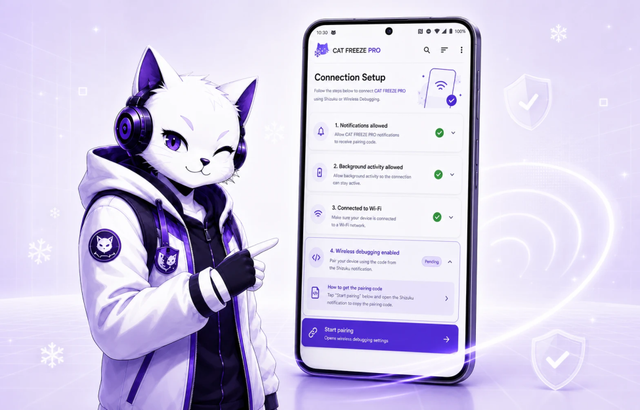
Cat Resolution Pro APK обращается напрямую к системной службе Android wm (Window Manager). Обычно операционная система блокирует доступ к этим параметрам, чтобы пользователь случайно не уменьшил интерфейс до нечитаемого состояния и не потерял сенсорное управление. Однако в Android оставлен доступ для отладки через разрешение ADB WRITE_SECURE_SETTINGS.
Вы подключаете телефон к компьютеру один раз, вводите одну команду ADB — и готово. Повторно подключать кабель после перезагрузки не требуется. Далее приложение использует механизм reflection для локальных вызовов IWindowManager при каждом изменении значений.
Если снизить разрешение экрана с 1080x2400 до 720x1600, программа автоматически пересчитает DPI, чтобы рабочий стол, шторка уведомлений и клавиатура не растянулись и не поплыли. Приложение учитывает физическое соотношение сторон дисплея и применяет оба значения одновременно.
Видеочипу вместо примерно 2,6 миллиона пикселей приходится отрисовывать около 1,1 миллиона на кадр. Нагрузка на GPU падает более чем на 50%, за счет чего частота кадров выравнивается мгновенно.
✨ Ключевые возможности Cat Resolution Pro APK
🐱 Работа полностью без Root-прав:
Не нужно ставить Magisk, KernelSU или разблокировать загрузчик. Достаточно выполнить простую команду ADB через ПК, выдать разрешение — и все. Статус Knox не нарушается, банковские клиенты работают штатно, а Netflix не сбрасывает качество до 480p из-за слетевшего сертификата Widevine L1.
🧮 Автоматическое масштабирование DPI:
Ручная смена экранных параметров часто ломает интерфейс. Если снизить разрешение без корректировки DPI, клавиатура Gboard может растянуться на весь экран, а шрифты станут нечитаемыми. Cat Resolution Pro APK производит расчет пропорций автоматически, сохраняя элементы интерфейса на своих местах.
⏱️ 10-секундный таймер безопасности:
Если выставить нестандартное разрешение, которое матрица экрана не сможет отобразить, дисплей обычно просто гаснет. В Cat Resolution Pro APK предусмотрена защита: запускается десятисекундный обратный отсчет, после которого настройки сбрасываются обратно на стандартные, если вы вручную не подтвердите выбор касанием.
🕹️ Произвольные разрешения и смена соотношения сторон:
На многих современных смартфонах используются вытянутые экраны 20:9 или 21:9, а вырезы под камеру часто перекрывают кнопки в играх. В приложении можно принудительно задать классический формат 16:9 (1080p или 720p). По бокам появятся аккуратные черные полосы, что особенно актуально для ретро-эмуляторов вроде PPSSPP, AetherSX2 или портов с PS2, которые растягиваются на широких панелях.
⚡ Отсутствие расхода батареи в фоне:
Большинство системных оптимизаторов постоянно висят в панели уведомлений, опрашивают датчики и сажают аккумулятор. Cat Resolution Pro APK не работает как постоянный фоновый процесс. Вы задаете параметры, операционная система поддерживает их самостоятельно, а приложение полностью завершает работу, не занимая память.
💾 Быстрые профили настроек:
В приложении можно сохранить готовые пресеты под разные задачи. Удобно держать профиль 720p для долгих игровых сессий без перегрева, сбалансированный вариант для повседневных задач и быстро возвращать родное разрешение при просмотре видео высокого качества.
💡 В чем польза Cat Resolution Pro APK
Это приложение спасает ситуацию, когда телефон начинает закипать в тяжелых играх. Если запустить Warzone Mobile, Genshin Impact или CarX Street на процессорах уровня Snapdragon 732G или Helio G99, картина знакомая: первые пять минут игра выдает стабильные 60 fps, затем корпус сильно нагревается, срабатывает троттлинг, и счетчик кадров проседает до дерганых 20–25 fps. Снижение разрешения рендера снимает с видеочипа основную нагрузку. Аппарат перестает перегреваться, а картинка идет плавно без микрофризов посреди боя.
Разница заметна и в повседневной автономности. Отрисовка высокого разрешения целый день быстро разряжает батарею даже в браузере или соцсетях. Снижение системного разрешения уменьшает нагрузку на шину памяти. На устройствах с изношенным аккумулятором это позволяет получить дополнительные полтора-два часа работы экрана без сильной потери четкости.
Приложение также решает проблему искаженных пропорций в эмуляторах и старых портах. Многие игры с PSP и PS2 разрабатывались строго под 16:9. На экранах 20:9 или 21:9 часть интерфейса попадает под вырез камеры или скругленные углы стекла. Принудительный режим 16:9 возвращает ровные рамки по бокам и центрирует кнопки управления.
Старым планшетам и бюджетным смартфонам утилита способна буквально продлить жизнь. Старое железо часто тормозит из-за того, что современные приложения слишком тяжелы для штатного разрешения экрана. Снизив разрешение на 30–40%, можно вернуть плавность отклика и превратить старый аппарат в читалку, кухонный экран для рецептов или простую консоль для ретро-игр.
🛠️ Советы по использованию
📐 Не занижайте разрешение слишком сильно:
Не стоит сразу выкручивать ползунок с 1080p до 480p. Частота кадров вырастет, но шрифты размоются, а мелкие детали превратятся в кашу. Для большинства вытянутых FHD+ экранов оптимальным диапазоном будет 720x1600 или 720x1520. Это дает разгрузку GPU при сохранении читаемости.
🖥️ Используйте оригинальные утилиты ADB:
Выдавая системные разрешения через ПК, избегайте неофициальных автоматических установщиков из описаний под видео. Скачивайте официальный архив platform-tools напрямую с сайта Google для разработчиков Android. Сторонние утилиты часто дают сбои соединения или вызывают ошибки драйверов в процессе передачи команд.
📝 Запишите заводские параметры экрана:
Обязательно сделайте скриншот или запишите родное разрешение и DPI перед внесением изменений. Если из-за экспериментальных значений интерфейс или рабочий стол отобразятся некорректно, вы сможете быстро восстановить заводские значения за пару секунд.
📱 Подэкранные сканеры отпечатков:
Обратите внимание: если в телефоне установлен оптический сканер отпечатков под стеклом, изменение плотности или соотношения сторон экрана может сместить область считывания. Если это рабочий смартфон, держитесь ближе к родным пропорциям или используйте графический ключ на время игры.
⌨️ Корректировка клавиатуры Gboard:
После изменения DPI клавиатура Gboard может стать слишком маленькой или наоборот растянуться. Чтобы это исправить, перейдите в Настройки Gboard > Настройки и измените пункт «Высота клавиатуры» на один пункт вверх или вниз. Это заставит клавиатуру корректно перерисоваться под новое значение DPI без перезагрузки системы.
📥 Как скачать и установить свежую версию Cat Resolution Pro APK
Для загрузки рекомендуется использовать проверенные каталоги вроде APKview.com, так как случайные ресурсы не всегда проверяют цифровые подписи APK перед публикацией.
Шаг 1: Откройте браузер на смартфоне и перейдите на APKview.com.
Шаг 2: Введите «Cat Resolution Pro APK» в строке поиска.
Шаг 3: Найдите актуальную версию установочного файла из проверенного источника.
Шаг 4: Нажмите кнопку загрузки и подтвердите сохранение файла в диалоговом окне.
Шаг 5: Разрешите установку из неизвестных источников. На большинстве устройств это находится в Настройки > Безопасность > Неизвестные источники (либо подтвердите разовое разрешение для вашего браузера).
Шаг 6: Нажмите на скачанный файл в папке «Загрузки».
Шаг 7: Нажмите «Установить» и подождите несколько секунд.
Шаг 8: После завершения откройте приложение и выполните вход при наличии профиля.
Примечание: Если при установке возникла ошибка, файл может быть поврежден либо не подходит под текущую версию Android. Попробуйте скачать файл заново или проверьте системные требования.
🔒 Безопасность использования
Cat Resolution Pro APK не портит аппаратную часть смартфона. Так как приложение работает без root-прав, оно физически не имеет доступа к системным разделам и не способно повредить ядро. Вы не прошиваете сторонние образы и не меняете загрузчик, поэтому превратить смартфон в «кирпич» здесь невозможно. Худший сценарий — некорректное отображение рабочего стола, которое сбрасывается штатной командой.
В плане конфиденциальности утилита также безопасна. Единственное выданное через ПК разрешение — WRITE_SECURE_SETTINGS, необходимое лишь для переключения штатных параметров дисплея Android. Приложение не требует доступа к накопителю, контактам, микрофону или камере и не передает данные на сторонние серверы. По сути, это просто графическая панель для стандартных консольных команд системы.
Самая частая проблема — ошибка ввода со стороны пользователя (например, случайный ввод 100x100, сбивающий сетку сенсора). Если вы не успели нажать отмену за 10 секунд таймера, подключите смартфон к ПК и поочередно выполните команды: adb shell wm size reset и adb shell wm density reset. Экран сразу вернется к исходным заводским параметрам без потери файлов и данных.
⚖️ Плюсы и минусы
✅ Плюсы:
- Полный контроль над разрешением и плотностью DPI без root-доступа и потери гарантии/Knox.
- Заметный прирост плавности кадров и снижение нагрева в требовательных 3D-играх.
- Экономия заряда аккумулятора, особенно на экранах AMOLED с частотой 120 Гц.
- Автоматический 10-секундный сброс параметров при сбое изображения.
- Возможность выставить классический режим 16:9 без обрезки интерфейса вырезом камеры.
- Полное отсутствие рекламы и скрытых фоновых служб.
❌ Минусы:
- Для начальной настройки требуется компьютер и несколько минут работы с ADB.
- На тяжелых оболочках (например, HyperOS или старых EMUI) значки в строке состояния могут отображаться со смещением.
- Оптические сканеры отпечатков под экраном могут работать нестабильно при смене соотношения сторон.
- Нет автоматической активации профилей при запуске конкретных игр — переключать режим нужно вручную.
- Программа не сделает из слабого процессора флагман, а лишь разгружает имеющийся видеоускоритель.
🏁 Итог — стоит ли скачивать?
Cat Resolution Pro APK — практичная утилита, полезная для продвинутых пользователей. Производители часто убирают гибкие настройки экрана из обычного меню, поэтому возможность быстро управлять масштабированием без root-прав очень выручает. Это не очередное бесполезное приложение для очистки памяти с навязчивыми баннерами, а реальный инструмент для стабилизации FPS и снижения нагрева.
Если в Warzone Mobile не хватает плавности или нужно продлить время работы смартфона от батареи в дороге, выделить пять минут на настройку однозначно имеет смысл.








