
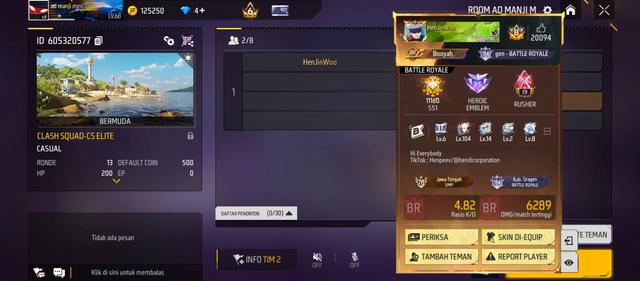
If you play fast paced Battle Royale games like Free Fire on an Android phone then you know what frustration I am talking about. You see an enemy on the map, slide your thumb into position for a clean headshot, but it feels like your screen is moving through molasses.
There’s a micro-stutter, a strange heaviness, or a tiny delay that ruins the entire play. I’ve been in that spot more times than I can count, and it’s infuriating because your hardware might actually be decent.
The problem is rarely the processor or the RAM—it’s the default Android system settings holding you back. The operating system is tuned for battery life and general scrolling, not the millisecond reaction times needed for competitive gaming.
SensiX Blue Magic APK is essentially a fix for that hidden input lag. Often we blame our own thumbs for losing a close range gunfight, but more often than not it’s system level bottlenecks ruining the match.
Gamers spend hours tweaking their in-game sensitivity, buying finger sleeves and practicing on training grounds but don’t pay any attention to how their phone handles the touch data and the synchronization with the display.
If you want to really improve your targeting and responsiveness without shady hacks that get you banned, you need to get into system level optimization. This utility bridges the huge gap between casual gaming and professional device tuning, giving you that snappiness and fluidity that you see in high level game play videos.
📌 What Is SensiX Blue Magic APK?
SensiX Blue Magic APK is a sophisticated system management utility designed specifically to enhance the fluidity and responsiveness of Android devices for power users and competitive gamers.
It isn’t one of those generic "game boosters" that just clears your recent apps and calls it a day. Instead, it offers granular control over how your hardware communicates with the display and processes input.
It was developed by Cyrust, a name that carries weight in the Android optimization scene thanks to reliable tools like the FFX SENSIX and Game Turbo series. This particular application is all about bridging the gap between the raw potential of your hardware and the sluggish default settings that manufacturers bake into the OS.
What truly differentiates this tool from basic optimizer apps is its utilization of the Shizuku framework. For those who don’t speak developer, Shizuku allows apps to access system-level APIs directly without needing full root access.
This is a huge game-changer. Historically, changing deep parameters like touch response layers or V-Sync synchronization required unlocking the bootloader, voiding your warranty, and leaving your device vulnerable.
SensiX Blue Magic APK taps directly into Shizuku to safely tweak those powerful global parameters. It’s a purely local optimizer and display calibrator—it doesn't inject code into game clients, modify third-party data, or offer illegal aimbots.
The tool focuses strictly on optimizing your phone’s native DPI scaling, touch latency, and RAM allocation so your physical movements translate instantly into in-game actions.
🎮 How Does It Work?
The core functionality of SensiX Blue Magic APK lies in intercepting and refining the signal path between your physical touchscreen and the Android OS. When you swipe your thumb, that analog input has to be digitized, processed by the CPU, and then rendered inside the game.
On stock devices, there is an intentional, tiny software delay added to this process to stabilize battery consumption or prevent ghost touches. This utility bypasses those artificial bottlenecks by fine-tuning the input response layer.
It forces the system to prioritize touch data with higher urgency, ensuring your drags and taps register with minimal latency. The result is a screen that feels instantly more "connected" to your fingers.
Except for touch, the app directly controls display scale and synchronization. Screen tearing and visual jitter happen when the GPU’s frame output becomes out of sync with the panel’s refresh rate.
SensiX Blue Magic APK tackles this by customizing the "Sensix Scale" and system V-Sync settings. It smooths out frame pacing so that fast camera pans look liquid instead of choppy. It essentially tells the display to stop sleeping on the job and prioritize real-time visual performance over low-energy idle states.
On top of that, the app uses an automated system flush mechanism. Heavy games leak memory and generate heat, leading to thermal throttling. This utility clears redundant cache files in real-time without disrupting your foreground process, keeping the thermal load balanced and the FPS steady through late-game circles.
✨ Key Features Of SensiX Blue Magic APK- The Ones Worth Knowing About
🔹 System-Level Touch Optimization.
This is the headliner. It fine-tunes the input response layer to drastically cut down system latency. If your drag shots always feel slightly "off" or heavier than they should, this recalibrates the polling rate to make your swipes feel instantaneous and crisp.
🔹 Advanced Display Scale & V-Sync Control.
Instead of leaving frame synchronization to the erratic default drivers, this feature lets you lock down the Sensix Scale. You eliminate screen tearing, ensuring that even when multiple enemies push you and explosions are going off, the visual fluidity doesn't fall apart.
🔹 Shizuku API Integration.
This is the secret sauce that provides safe, root-free power. It uses Android’s built-in developer protocols to apply deep system tweaks. You get root-level performance tuning without tripping banking app security or permanently unlocking your bootloader.
🔹 Real-Time HUD Overlay.
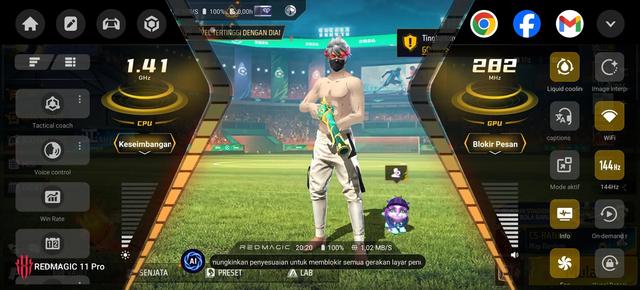
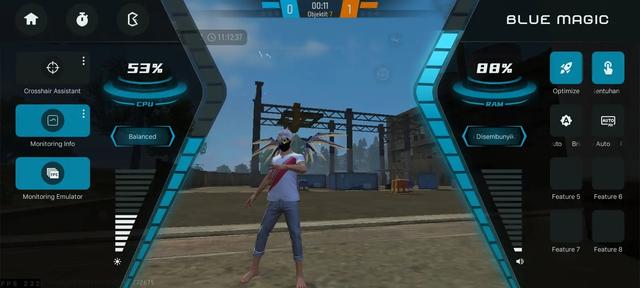
You get a non-intrusive floating monitor you can place anywhere on the screen. It tracks your thermal status, current FPS, and RAM load. You don’t need to minimize the game to check if your phone is throttling; the data is right there in real-time.
🔹 Automated Cache Flushing.
Manually clearing cache between matches is a chore. This toolkit automatically purges redundant background data and system junk while you’re in-game. It does this silently without causing the stutter that usually comes with manual memory clears, keeping the device running fresh.
🔹 Performance Scaling Modes.
You aren’t stuck with one setting. You can activate ‘Execute Performance’ for a raw, high-speed boost in ranked matches, or switch to a ‘Balanced Mode’ for longer casual sessions where you don’t want your battery to drain in an hour.
🔹 Customizable Aim Overlays.
It includes a suite of practical on-screen crosshairs that sit at the center of the screen independent of the game. This is great for hip-firing or pre-aiming, giving you a static visual guide that helps you center your target before you even scope in.
💡 Benefits of Using SensiX Blue Magic APK
The primary benefit you’re going to notice in your first match is consistency. Android devices tend to fluctuate in performance based on heat and background processes, which ruins muscle memory.
When your frame timing is erratic, you can’t build a reliable flick shot. By using this tool to lock in the display scale and minimize input lag, your device behaves exactly the same way every fight.
That split-second hesitation where you drag and the scope lags behind? It vanishes. You start hitting shots that you used to choke because the input is finally predictable, allowing your reflexes to actually do their job without a software filter getting in the way.
SensiX Blue Magic APK is also a lifeline for budget and mid-range devices. The "gaming phone" market is expensive, and not everyone has a device with active cooling and a 144Hz panel. If you are gaming on a device that struggles with RAM management and thermal throttling, this app helps you punch above your weight class.
The automated system flush prevents the game from turning into a slideshow during the final zone. By managing memory leaks and clearing junk cache continuously, it prevents the hardware from choking when things get chaotic.
It effectively extends the competitive lifespan of your phone, keeping it viable for Battle Royale titles long after it has started to feel "old" on stock settings.
There’s also the huge benefit of security and account safety. The competitive mobile gaming space is plagued by "config files" and "mod menus" that promise zero recoil but eventually hand out permanent account bans.
SensiX Blue Magic APK never manipulates game data. It does not read your game memory or alter character stats. It simply makes your physical device better at rendering the game. Anti-cheat engines look for code injection, not for phones that manage their DPI and touch data efficiently.
If they banned you for having a responsive screen, they’d have to ban every player using a high-end gaming phone. This tool gives you a legitimate hardware-level advantage by making your current phone run the way it should.
🛠️ Tips to Get the Most Out of It
🔸 Master Shizuku Before Launching.
The app is dead without Shizuku. Don’t skip the pairing process. Use Wireless Debugging in your Developer Options to get the service running. If Shizuku isn’t active in your notification shade, the app is just an empty shell that can’t apply any tweaks.
🔸 Start With Balanced Mode.
It’s tempting to crank the touch response to max and select "Execute Performance" immediately, but that’s a fast track to overheating. Start on a balanced setting. Play a Team Deathmatch. If the phone stays cool, slowly scale up. Let your hardware acclimate.
🔸 Keep the Thermal Monitor Visible.
For the first week, keep the small FPS and temperature overlay active in a corner. If you see the battery temperature spiking into the 43-45°C range consistently, that’s your cue to pull back the scaling. Thermal throttling cuts frames harder than any lag.
🔸 Recalibrate In-Game Sensitivity.
This is the step most people forget. You just made your screen significantly faster and more responsive. Your old high-sensitivity settings will now feel wildly over-spun. Drop your general in-game sensitivity by 10-20 points and test it. You need less drag to achieve the same camera movement now.
🔸 Control Your Background Noise.
The automated flush is smart, but it isn’t magic. If you’ve got social media, streaming apps, and a dozen widgets running, you’re fighting the app. Give yourself a clean slate by swiping away recent apps before launching the game. The less garbage to clear, the better the flush works.
🔸 Customize the Crosshair Wisely.
Don’t just use a fat, distracting circle. Choose a thin, minimal crosshair, and color it neon green or magenta. Set the opacity to around 70%. This keeps it visible on dark grass and light sky textures without blocking your view of enemy silhouettes at long range.
📥 How to Download and Install SensiX Blue Magic APK Latest Version
The most reliable and safe place to download from I recommend APKview.com as your resource. Random download sites don’t have that security layer of checking APK signatures before publishing.
Step 1: Open the browser on your Android device and go to APKview.com.
Step 2: Type “SensiX Blue Magic APK” in the search box.
Step 3: Find the Latest Version of APK file Available Make sure it is from a trusted source on the site.
Step 4: Choose the download button. Your device might prompt you to confirm if you want to download the file – confirm if you want to download it.
Step 5: This is where most people get it wrong. You must allow installations from Unknown Sources. On most Android phones, go to Settings > Security > Unknown Sources and toggle it on. Some new phones may ask you to give permission for your browser only – just do what it tells you on your screen.
Step 6:Tap the downloaded APK file. It’s usually sitting in your Downloads folder.
Step 7: Click on Install and wait for few seconds. It's fairly fast.
Step 8: When done, open the app and sign up or login, if you have an existing account.
Just a note : If you get an error , then the file is probably corrupted or you downloaded the wrong version. Download it again or check your Android version to see if it is supported.
🔒 Is It Safe to Use? Here's the Honest Take
Let's have the blunt conversation about safety because it’s the number one concern when installing tools that ask for system-level access. The honest answer is that SensiX Blue Magic APK is safe, but only if you understand the distinction between a system optimizer and a cheat engine.
This tool doesn’t pry into the game’s process memory. It doesn’t look at player coordinates, it doesn’t try to modify hitboxes, and it doesn’t inject a fake aim assist. Because it never crosses the line into modifying game binaries or live data, it stays invisible to anti-cheat systems. Battle Royale anti-cheats scan for unauthorized code execution within the game app, not for a device that processes touch events faster.
The real security magic comes from the Shizuku integration. Shizuku leverages ADB (Android Debug Bridge) permissions, a legitimate protocol written into Android by Google for developers.
It operates securely within the sandbox parameters without performing a dangerous root exploit. This keeps SafetyNet and Play Integrity intact, meaning banking apps, wallet apps, and secure login systems will keep working.
However, the real danger doesn’t lie in the original software; it lies in fake versions. Gamers desperate for an edge download "premium unlocked" versions from random pop-up sites and end up with spyware. As long as you source the APK strictly from trusted spots like APKview.com or the direct Cyrust channel, your device and your gaming accounts remain perfectly safe.
⚖️ Pros and Cons — The Unfiltered Take
✅ Pros:
- Reduces input delay significantly, making the touchscreen feel more analog and directly connected to your thumbs.
- Provides root-level performance adjustments through Shizuku without voiding the warranty or triggering bank app blocks.
- Automated RAM flushing works quietly in the background to prevent late-game stutters without interrupting music or comms.
- Real-time thermal and FPS overlays eliminate the guesswork about whether your device is currently throttling performance.
- It is completely file-safe; it does not touch game directories or memory, keeping you clear of anti-cheat detection in Free Fire or similar titles.
- The UI is modern, logically laid out, and doesn’t try to push mining scams or intrusive ads like generic boosters do.
❌ Cons:
- The setup requires patience; enabling Wireless Debugging and pairing Shizuku is not a one-click install for non-tech-savvy users.
- Running on Maximum Performance mode on older, budget devices with poor cooling can cause rapid overheating and battery drain.
- You’ll need to spend time finding the new sweet spot between the system-wide DPI tweaks and your in-game sensitivity controls.
🏁 Final Verdict — Is It Worth Downloading?
If you’re a super casual player who only logs in for a few minutes of mindless fun, the technical setup of SensiX Blue Magic APK might not be worth the effort. You probably won’t notice the millisecond latency shavings if you’re not sweating for the win.
But if you’re a competitive grinder in ranked Free Fire mode, constantly dying to frame drops or sluggish turning speed, this tool is a necessity. It’s one of the rare apps on the Android scene that actually fulfills its marketing promises. It doesn’t just draw a fake RAM cleaner UI that does nothing; it actively rewrites the way your hardware responds to touch through secure system protocols.
The integration of Shizuku is the smartest play here because it lowers the barrier of entry to true low-level tuning. You don’t need to brick a phone trying to root it just to get a smooth frame rate. It provides a legitimate, hardware-focused advantage that translates directly into better aim tracking and faster situational reaction.
The difference between a stock DPI sync and a tuned one is the difference between losing a spray fight and landing the headshot. Take the time to configure it properly, keep a close eye on your device’s thermal output, and source it from APKview.com to avoid dirty files. SensiX Blue Magic APK is a genuine asset for anyone trying to compete at a higher level.








